FAQ
I. Core Definition and Key Features
A Spot Bonus is a coupon used for spot trading. It allows users to generate profits by buying and selling spot assets, giving them a chance to experience real spot trading at no cost while enjoying profit opportunities without bearing any trading losses. Its key features include:
Dedicated to Spot Trading: Spot Bonus may only be used for trading designated spot pairs. The bonus itself cannot be withdrawn or transferred. It may only be used as trading capital.
Standalone Use for Each Position: Each spot trade can use only one Spot Bonus Coupon when opening a position. It cannot be used together with the user’s own USDT funds in the same trade.
Fixed Face Value: Each Spot Bonus Coupon comes with a preset face value. Only one coupon may be used per trade. Multiple coupons cannot be split or combined for use in a single trade.
Validity Period: Each Spot Bonus Coupon has a validity period. Users must complete trading within the coupon’s valid period in order to generate eligible profits. Any unused coupon will automatically expire after the validity period ends, and any unused bonus amount will be reclaimed by the system. If a coupon has already been used, it will be settled automatically upon expiry.
Profit Calculation Rules: Profit from Spot Bonus trading is calculated as sell value of the bonus-funded asset minus buy value of the bonus-funded asset. No trading fees are charged on Spot Bonus trades.
Profit Distribution Rules: Any profit generated through Spot Bonus trading will be credited to the user’s account according to the pre-set payout rules of each coupon, and will become withdrawable real assets.
Loss Coverage: Any losses incurred from Spot Bonus trades will be covered by the platform.
II. How to Use Spot Bonus
View Spot Bonus Coupons
In the Rewards Hub, users can view the list of Spot Bonus Coupons in their account, along with full coupon details, including face value, profit withdrawal rules, eligible trading pairs, and expiry date. For coupons that have already been used, users can click to view profit details.
Each coupon clearly displays its face value, such as 50 USDT or 100 USDT, as well as its expiry time, and includes a Use button for one-click access.
Method 1: View via the Rewards Hub
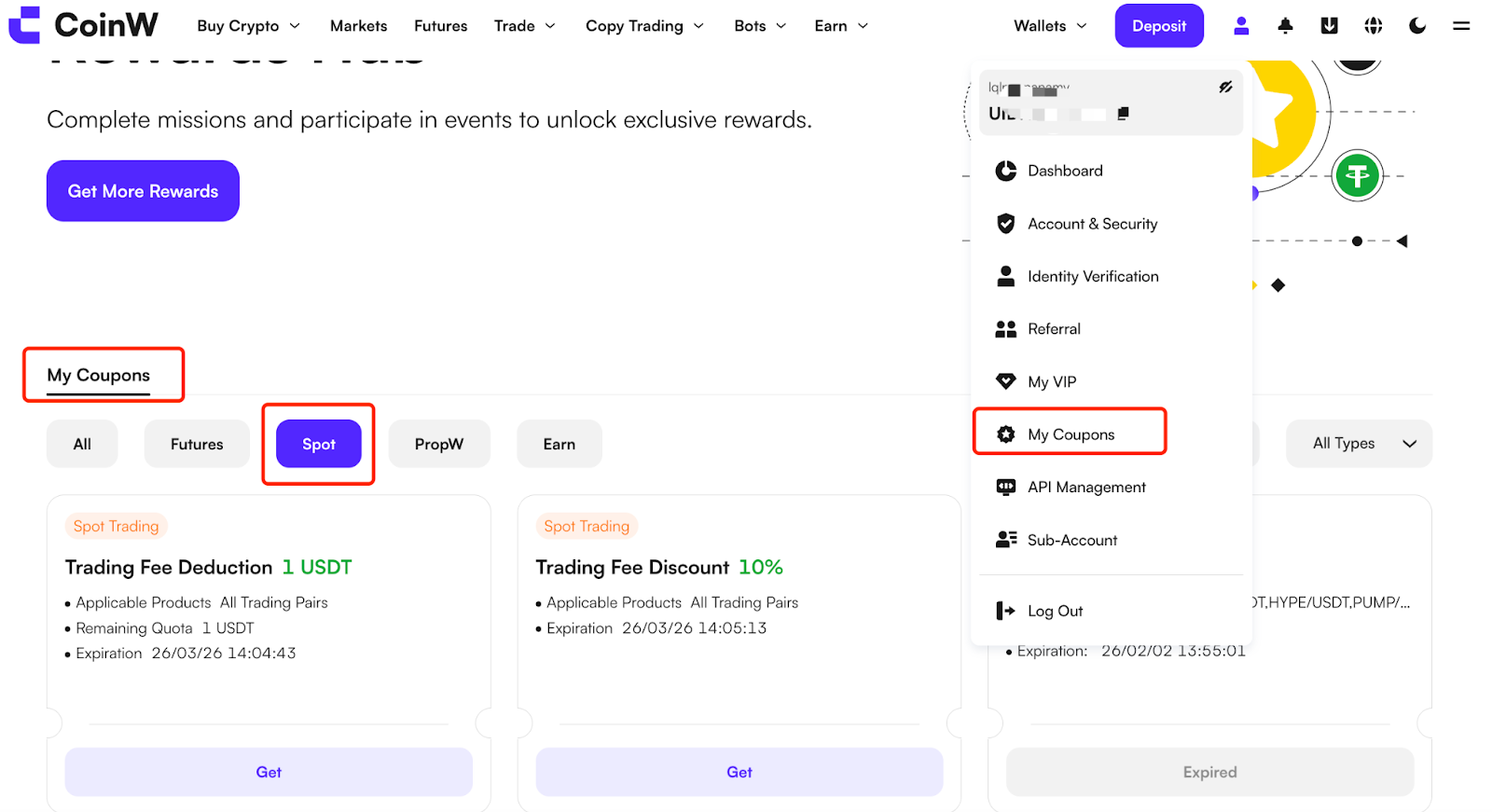
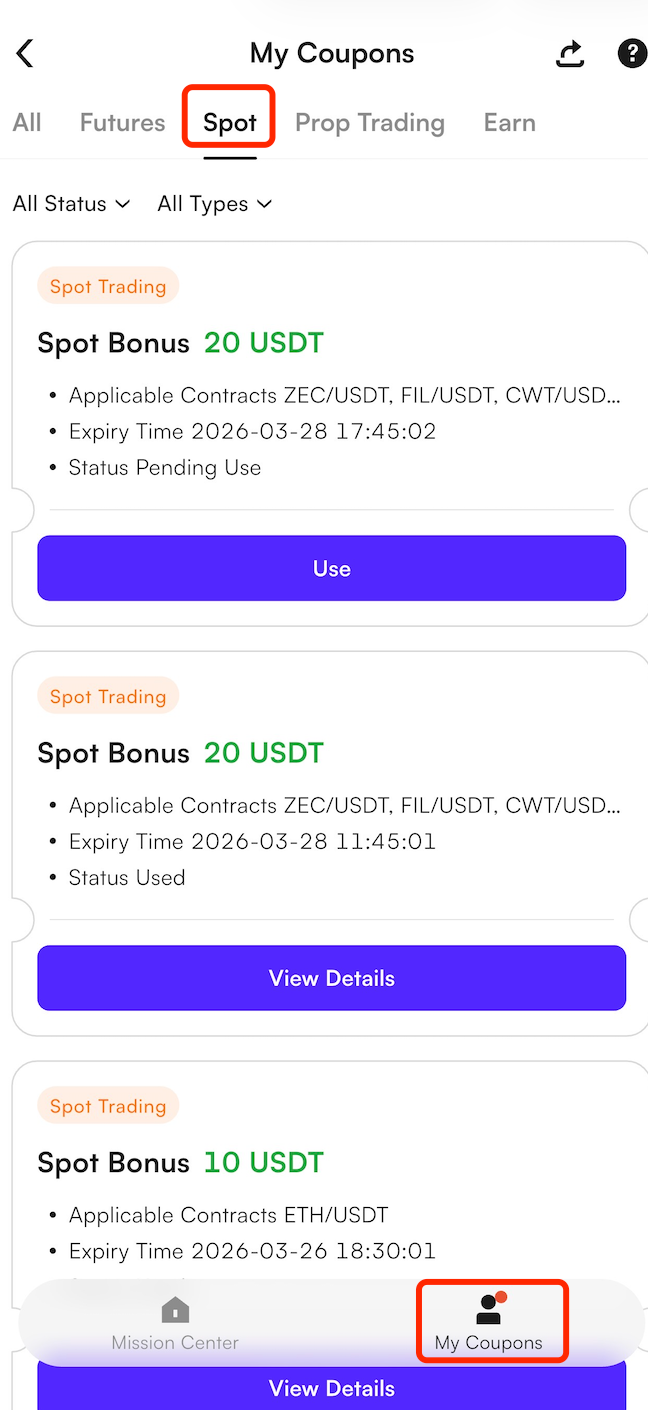
Open the platform’s Rewards Hub, switch to the Spot category, or click My Coupons from the dropdown menu under your profile in the top-right corner as shown below. All claimed Spot Bonus Coupons and their statuses will be displayed here. If there are available coupons, you will be able to view the amount, usage conditions, and validity period of each one.
WEB:
APP:
Method 2: View via the Trading Page
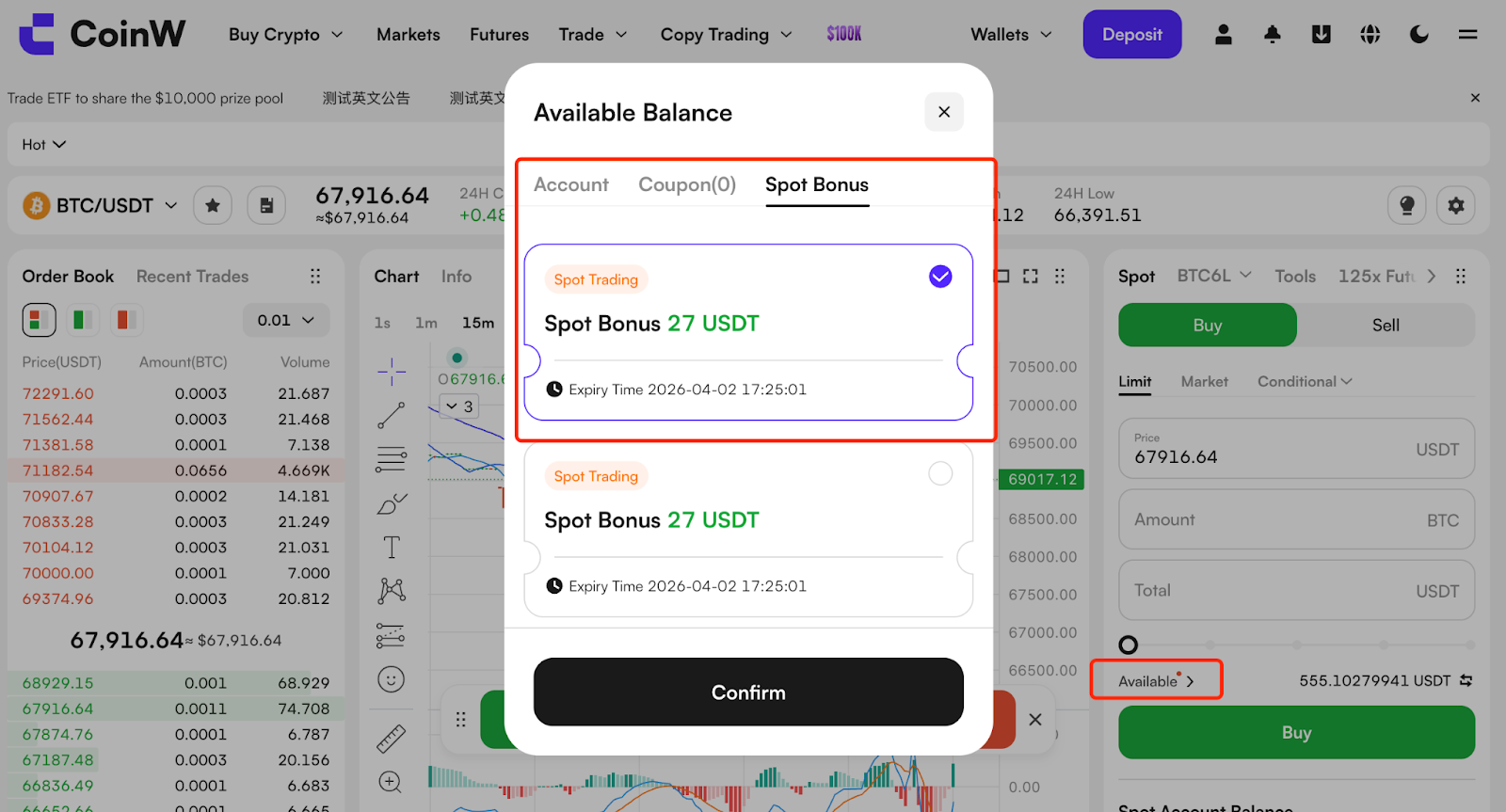
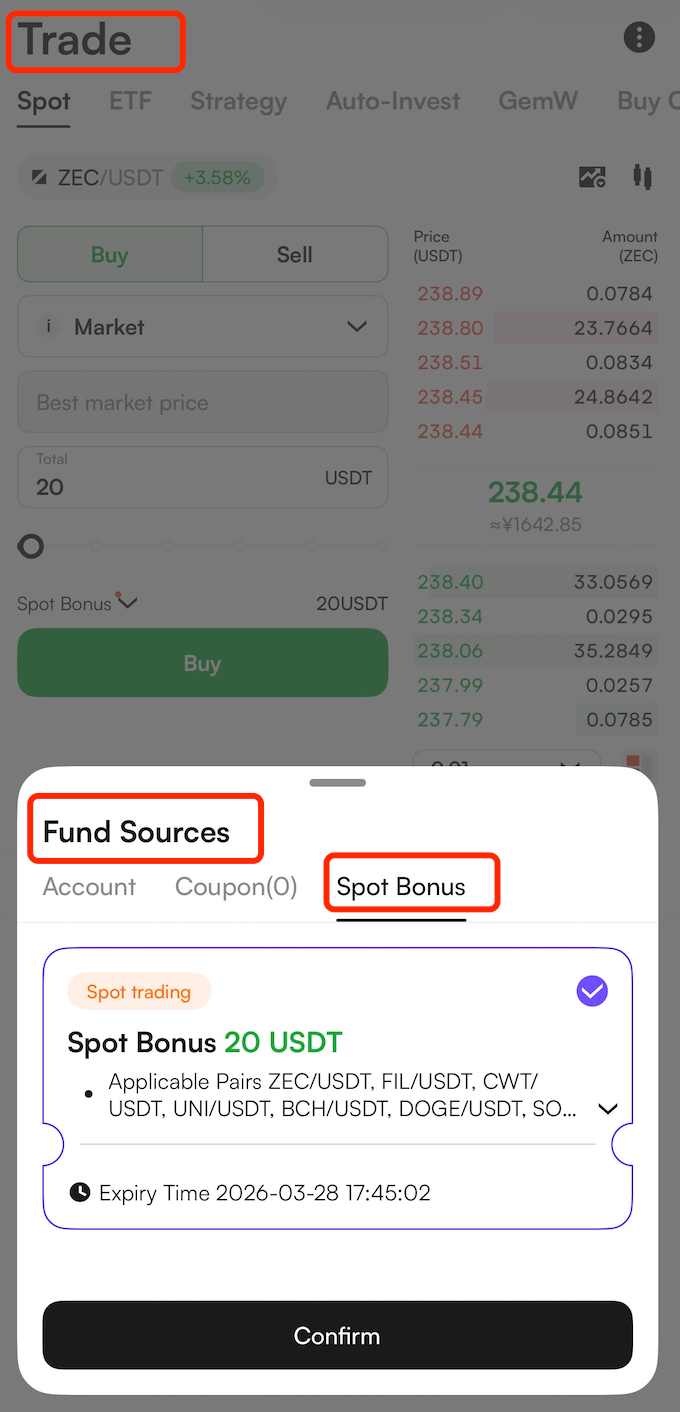
You can also check whether any Spot Bonus Coupons are available directly on the spot trading page. On the page for an eligible trading pair, click the Available button above the trading panel, then select Spot Bonus from the pop-up options. The system will then display all Spot Bonus Coupons currently available in your account.
WEB:
APP:
Use a Spot Bonus Coupon
Read the Coupon Rules
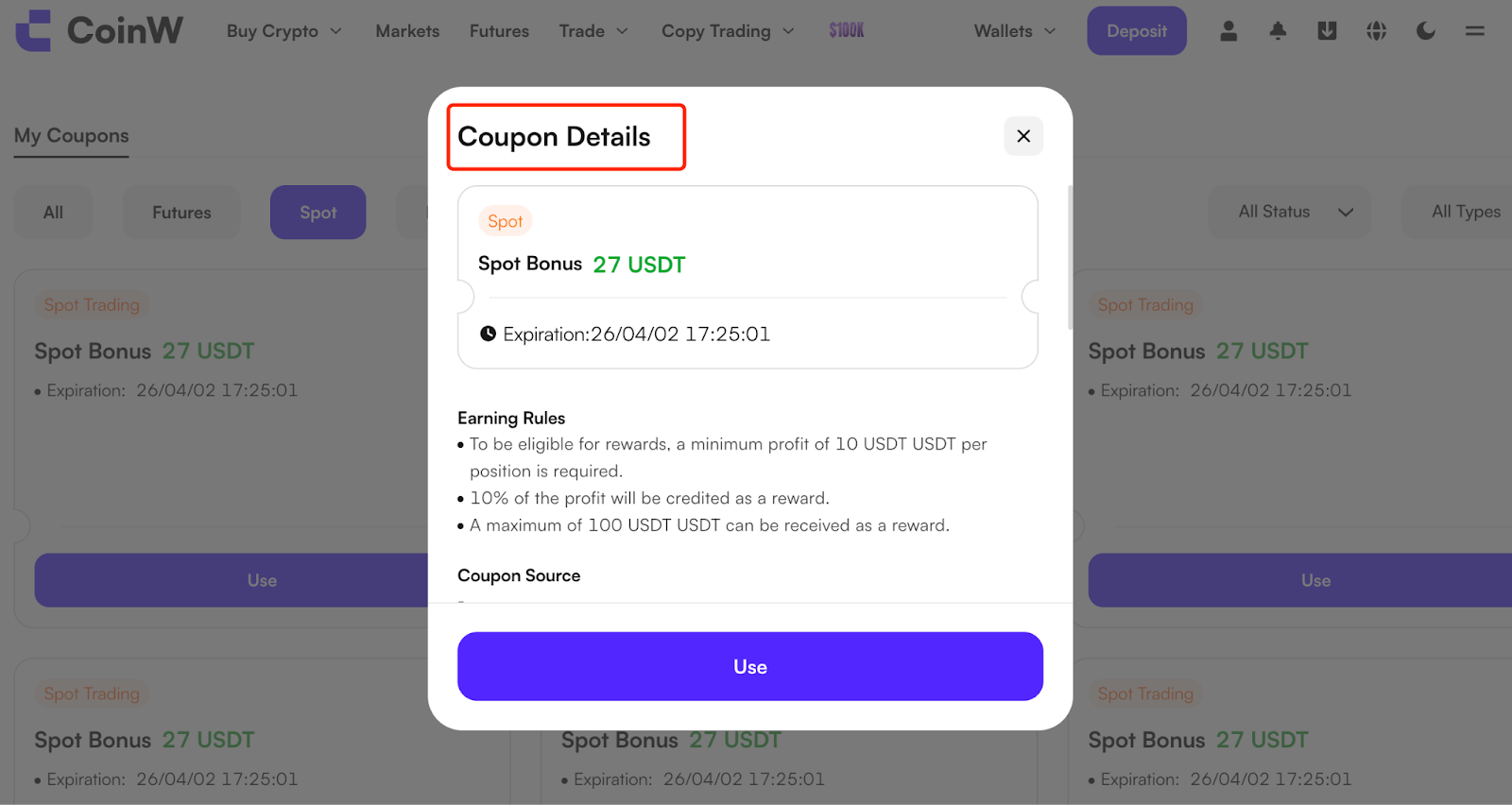
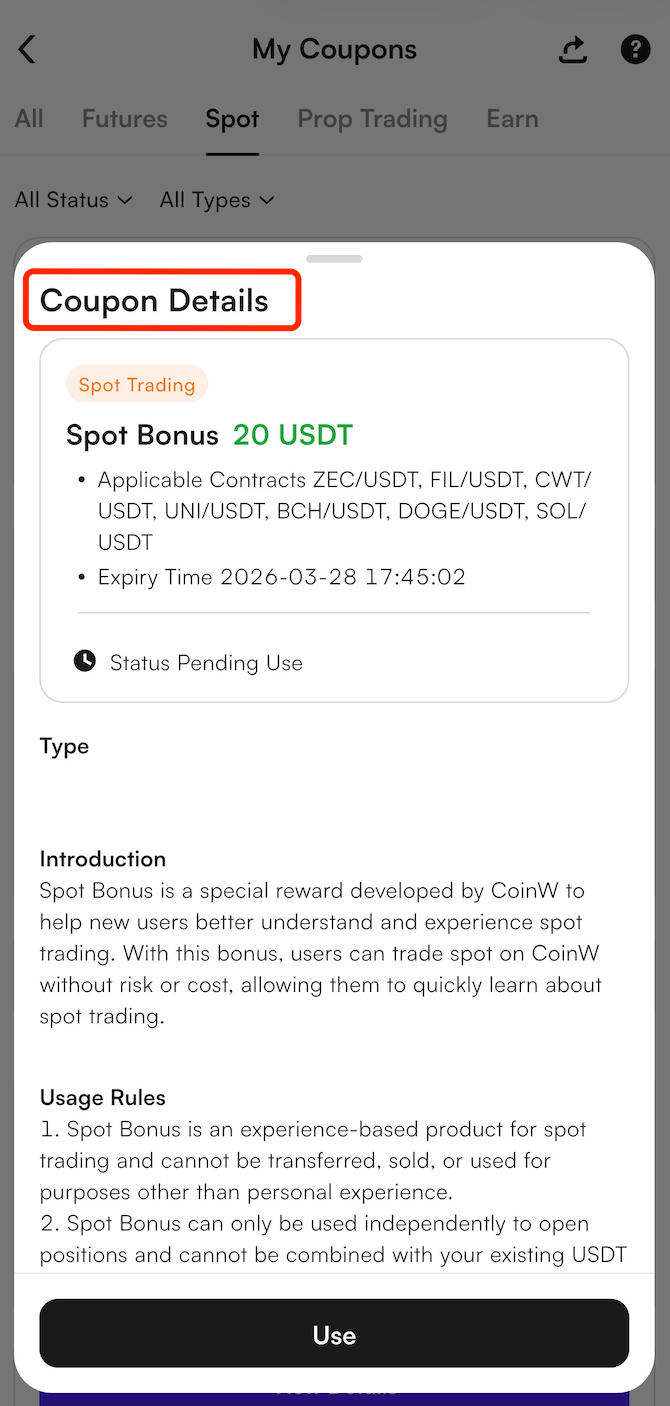
Before using a coupon, please first review its supported trading pairs, profit rules, and coupon description, if applicable. These details are usually available on the Spot section of My Coupons under the coupon details page.
WEB:
APP:
Select the Appropriate Coupon
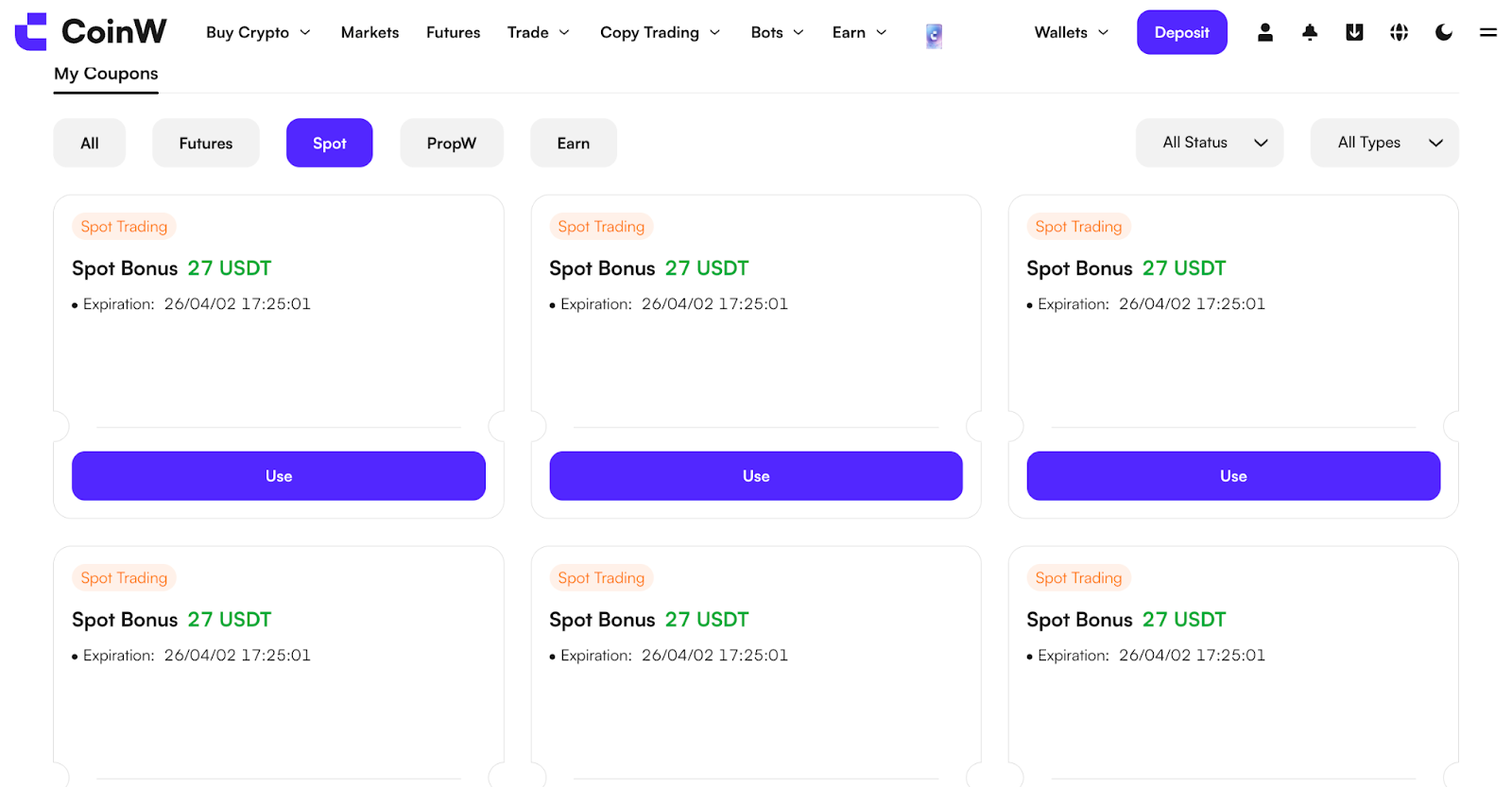
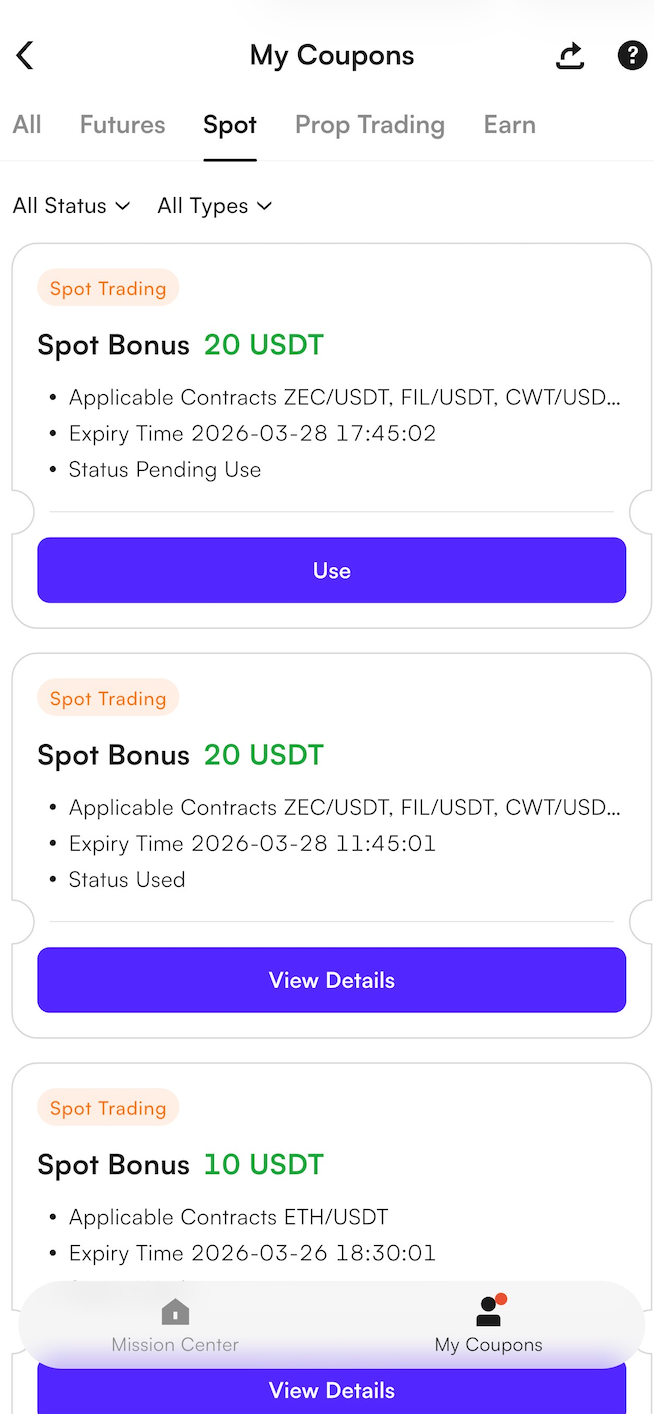
Go to the spot trading page for the trading pair supported by the coupon. Some coupons may only be used for specific tokens. You can either search for the trading pair manually or click the Use button in the coupon details page to jump directly to the relevant spot market.
WEB:
APP:
Click “Use” to Trade
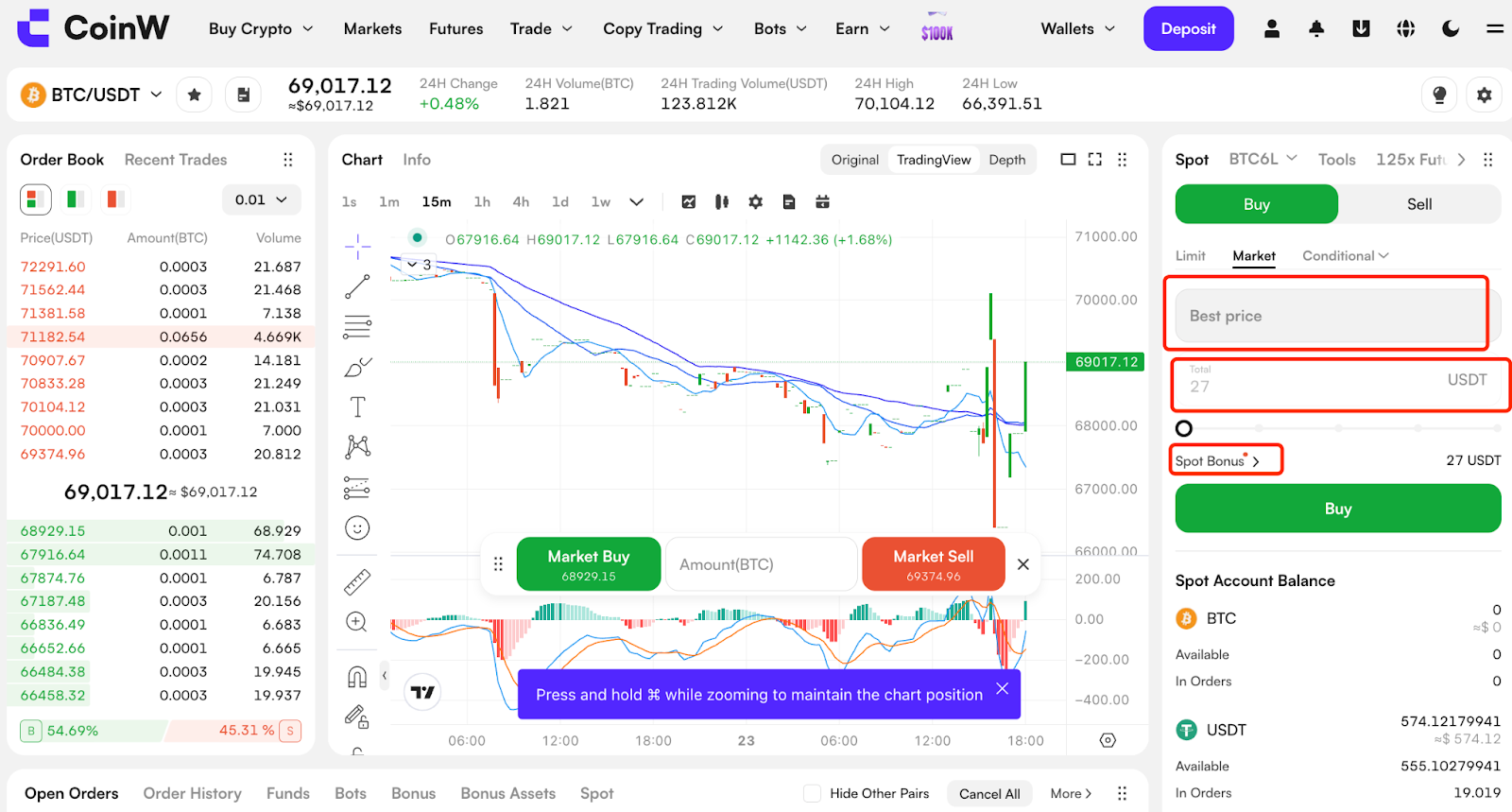
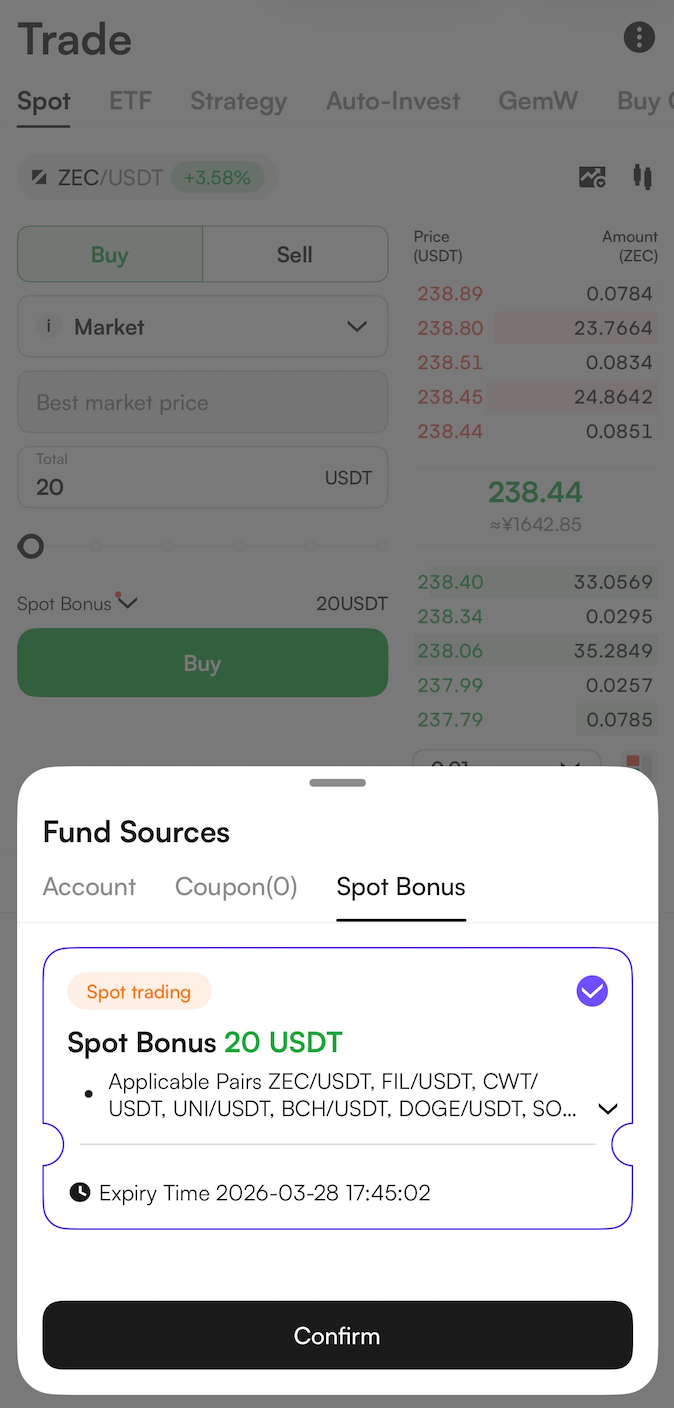
After clicking the Use button, the order window will automatically populate with a Market Order and the Amount will be set to the coupon’s face value. Click Buy, and the system will execute the trade using a smart market order.
WEB:
APP:
View Bonus-Funded Assets
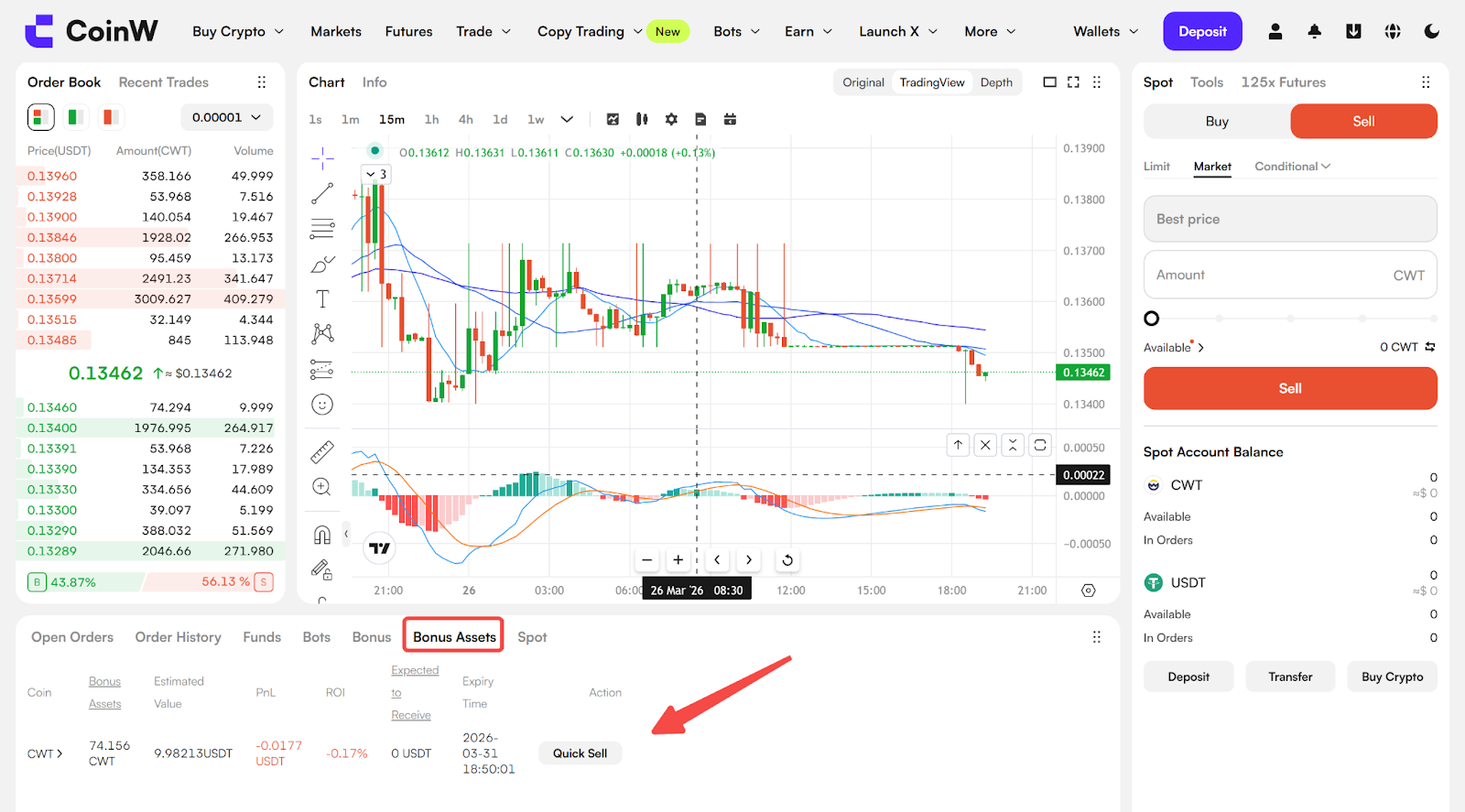
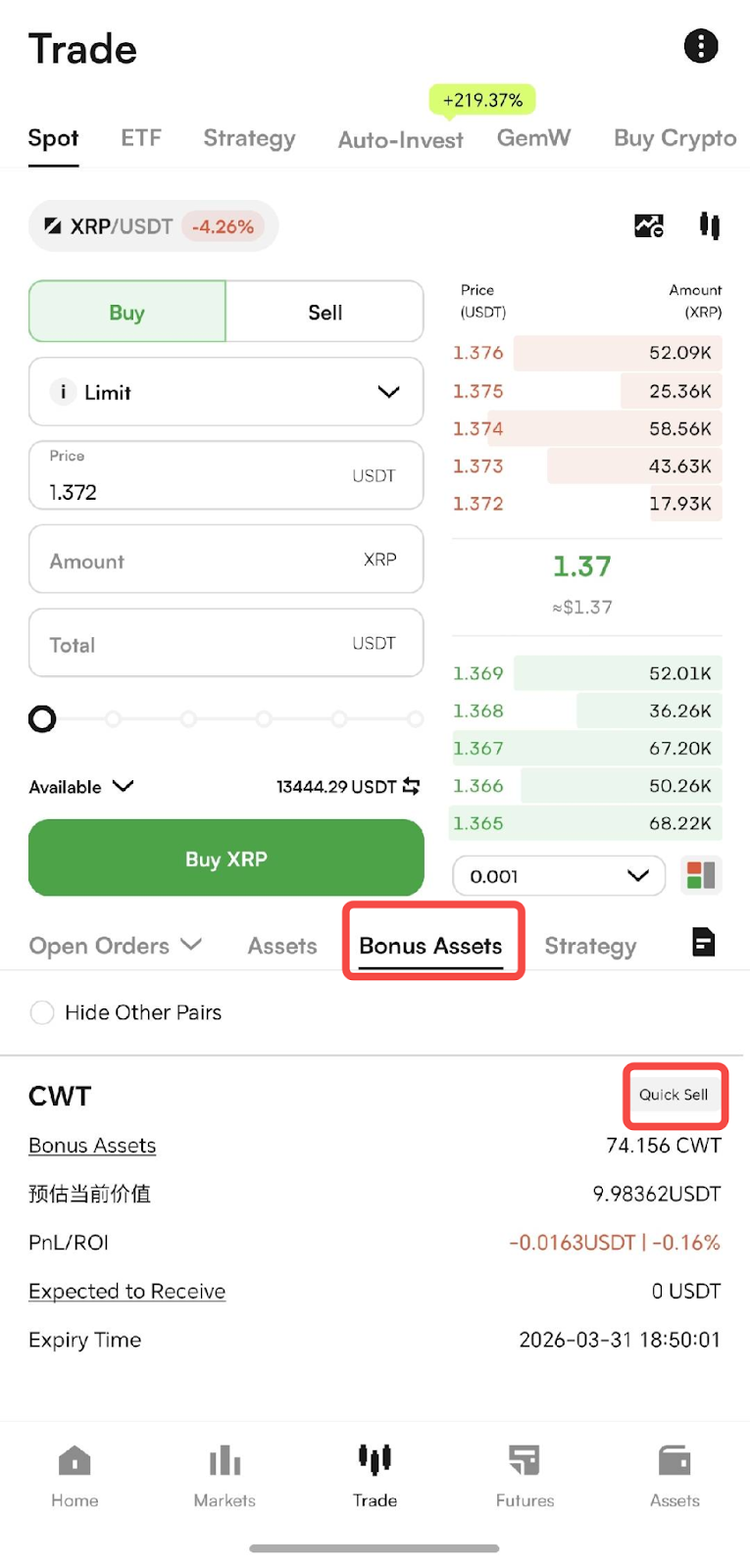
On the candlestick chart page, the tab below will display the details of the purchased bonus-funded assets, including profit data and expiry time. Users can review the position and choose to Quick Sell when appropriate.
WEB:
APP:
Sell Bonus-Funded Assets
On the Bonus Assets page below the candlestick chart, you can click “Quick Sell” and the system will automatically execute the sell order and settle the profit.
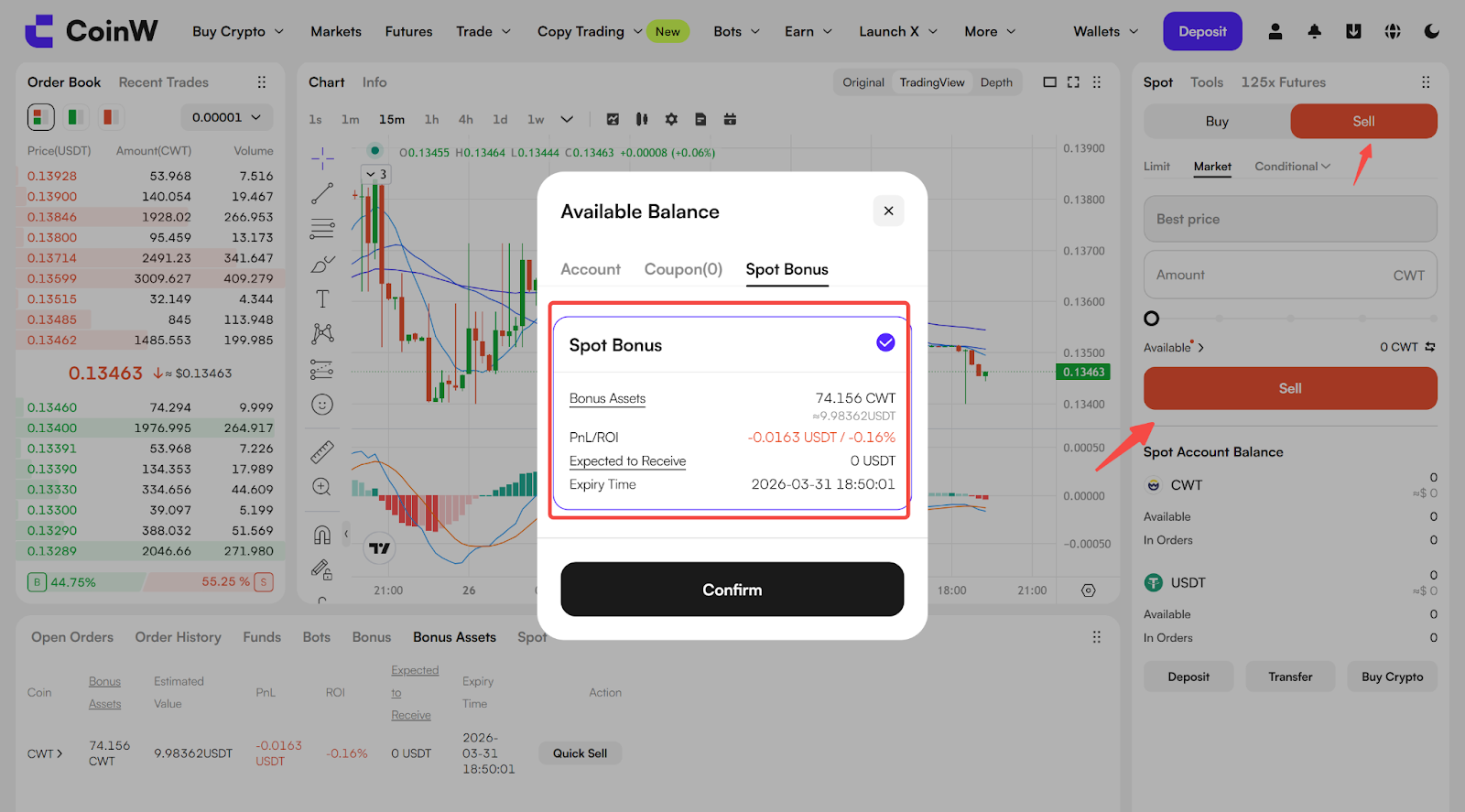
You may also click Available in the Sell order window to view the details of your Spot Bonus Coupons. After confirming, the system will automatically populate the Market Order and the quantity of the bonus-funded asset.
WEB:
APP:
Profit Credited to Account
Once you click Sell, the system will calculate the profit based on the coupon’s profit performance and payout rules, and the eligible profit will be credited to your funding account. You may view the details in the Account Statement.
III. View Spot Bonus Usage Records
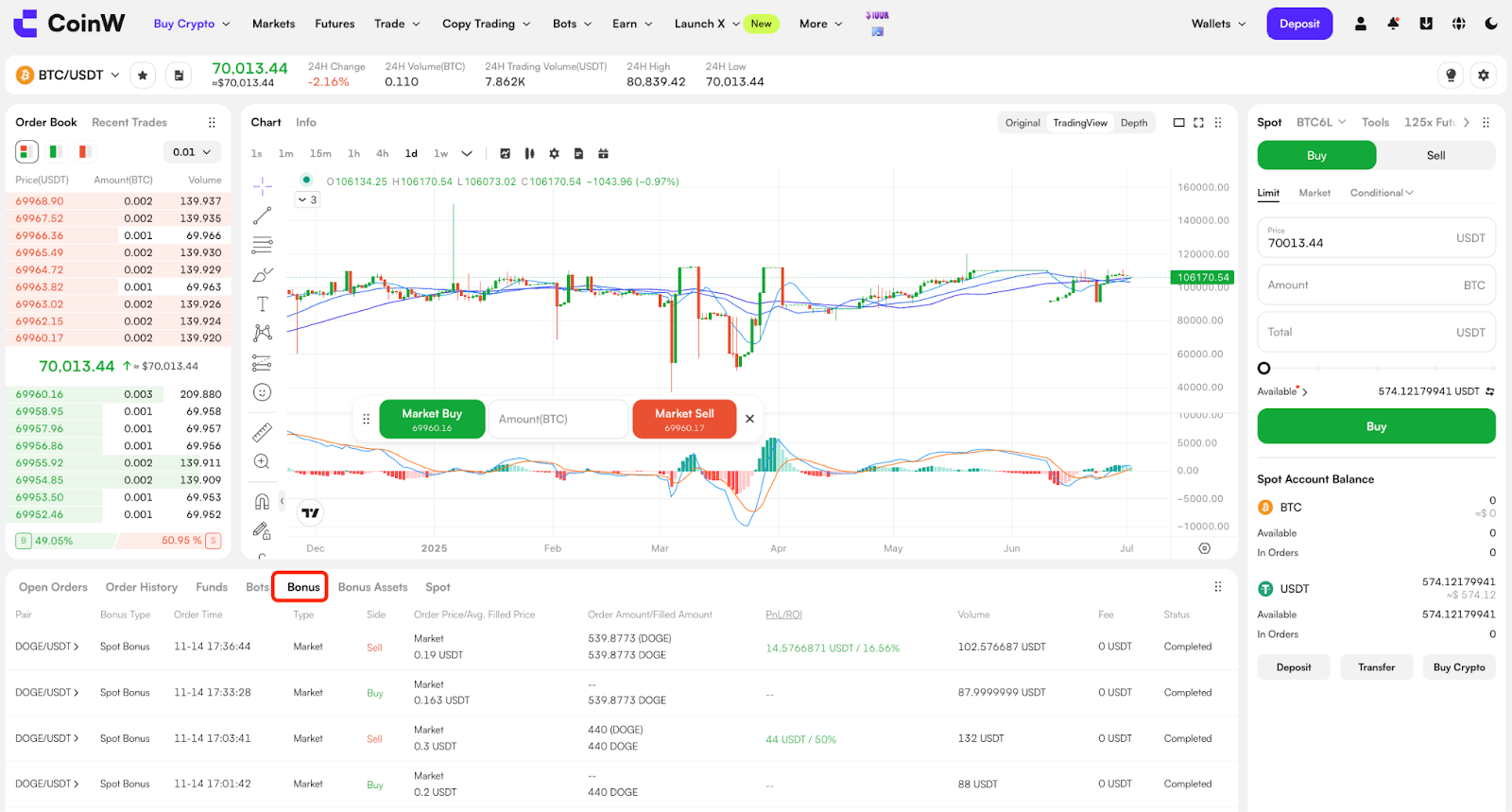
Trade and Profit Details: In the historical records section below the candlestick chart on the spot trading page, you can find tabs related to Bonus. By clicking this section, you can view detailed records of your Spot Bonus trades, including transaction time, quantity of tokens purchased, and final profit after the bonus-funded asset is sold. This record allows users to track the usage and profit performance of each Spot Bonus Coupon.
Expiry Settlement Rules: The validity period of a Spot Bonus Coupon refers to the deadline for bonus reclamation. Regardless of whether you have traded or not, once the coupon reaches its expiry time, it will automatically become invalid. For coupons that have already been used to open a position, once the validity period ends, the system will automatically sell the purchased asset at the market price to complete profit and loss settlement. After auto-closing, any profit generated from the trade will still belong to that coupon and will be distributed to the user according to the applicable rules, meaning it will be credited to the user’s account as withdrawable funds. The face value of the coupon itself will expire. Any loss will be absorbed by the coupon, and the user will not bear any loss.
View Bonus Profit: Profit generated from Spot Bonus can be viewed in the Account Statement.
If the trade is closed with a profit, the transfer of bonus profit to the user’s account can be found in the platform’s Account Statement history.
FAQ
1. Why does the face value of my Spot Bonus not match the actual trade amount?
Due to minimum order size requirements for different trading pairs, the actual trade amount may differ from the coupon’s face value. For example, the minimum trading quantity for BTC may be 0.0001 BTC, so the actual trade amount will be calculated as: minimum quantity × execution price. As a result, the final trade amount may be slightly lower than the coupon’s face value.
2. Why is the estimated profit different from the actual profit after selling?
The estimated profit is calculated based on the latest market price, while the final sell execution is based on the current best bid price in the order book. Therefore, the actual realized profit may differ from the estimated amount.
3. Profit Rules
Minimum Profit Threshold: If a minimum profit threshold is set, the user must reach that threshold for the trade to qualify as profitable. For example, if the threshold is set at 10 USDT and the actual profit is only 5 USDT, the threshold has not been met, the trade will not be considered profitable, and no reward will be distributed.
Maximum Withdrawal Ratio: This refers to the proportion of profit that the user may withdraw. For example, if the actual profit is 10 USDT and the ratio is set at 100%, the user may withdraw the full 10 USDT. If the ratio is set at 50%, the user may withdraw only 5 USDT. Please note that the maximum withdrawal ratio applies to the profit amount, not to the coupon’s face value.
Maximum Withdrawal Amount: This refers to the maximum amount of profit that may be withdrawn from a Spot Bonus Coupon. For example, if the actual profit is 100 USDT and the maximum withdrawal amount is set at 80 USDT, the user will receive only 80 USDT as the final airdrop.
I. Core Definition and Key Features
A Spot Bonus is a coupon used for spot trading. It allows users to generate profits by buying and selling spot assets, giving them a chance to experience real spot trading at no cost while enjoying profit opportunities without bearing any trading losses. Its key features include:
Dedicated to Spot Trading: Spot Bonus may only be used for trading designated spot pairs. The bonus itself cannot be withdrawn or transferred. It may only be used as trading capital.
Standalone Use for Each Position: Each spot trade can use only one Spot Bonus Coupon when opening a position. It cannot be used together with the user’s own USDT funds in the same trade.
Fixed Face Value: Each Spot Bonus Coupon comes with a preset face value. Only one coupon may be used per trade. Multiple coupons cannot be split or combined for use in a single trade.
Validity Period: Each Spot Bonus Coupon has a validity period. Users must complete trading within the coupon’s valid period in order to generate eligible profits. Any unused coupon will automatically expire after the validity period ends, and any unused bonus amount will be reclaimed by the system. If a coupon has already been used, it will be settled automatically upon expiry.
Profit Calculation Rules: Profit from Spot Bonus trading is calculated as sell value of the bonus-funded asset minus buy value of the bonus-funded asset. No trading fees are charged on Spot Bonus trades.
Profit Distribution Rules: Any profit generated through Spot Bonus trading will be credited to the user’s account according to the pre-set payout rules of each coupon, and will become withdrawable real assets.
Loss Coverage: Any losses incurred from Spot Bonus trades will be covered by the platform.
II. How to Use Spot Bonus
View Spot Bonus Coupons
In the Rewards Hub, users can view the list of Spot Bonus Coupons in their account, along with full coupon details, including face value, profit withdrawal rules, eligible trading pairs, and expiry date. For coupons that have already been used, users can click to view profit details.
Each coupon clearly displays its face value, such as 50 USDT or 100 USDT, as well as its expiry time, and includes a Use button for one-click access.
Method 1: View via the Rewards Hub
Open the platform’s Rewards Hub, switch to the Spot category, or click My Coupons from the dropdown menu under your profile in the top-right corner as shown below. All claimed Spot Bonus Coupons and their statuses will be displayed here. If there are available coupons, you will be able to view the amount, usage conditions, and validity period of each one.
WEB:
APP:
Method 2: View via the Trading Page
You can also check whether any Spot Bonus Coupons are available directly on the spot trading page. On the page for an eligible trading pair, click the Available button above the trading panel, then select Spot Bonus from the pop-up options. The system will then display all Spot Bonus Coupons currently available in your account.
WEB:
APP:
Use a Spot Bonus Coupon
Read the Coupon Rules
Before using a coupon, please first review its supported trading pairs, profit rules, and coupon description, if applicable. These details are usually available on the Spot section of My Coupons under the coupon details page.
WEB:
APP:
Select the Appropriate Coupon
Go to the spot trading page for the trading pair supported by the coupon. Some coupons may only be used for specific tokens. You can either search for the trading pair manually or click the Use button in the coupon details page to jump directly to the relevant spot market.
WEB:
APP:
Click “Use” to Trade
After clicking the Use button, the order window will automatically populate with a Market Order and the Amount will be set to the coupon’s face value. Click Buy, and the system will execute the trade using a smart market order.
WEB:
APP:
View Bonus-Funded Assets
On the candlestick chart page, the tab below will display the details of the purchased bonus-funded assets, including profit data and expiry time. Users can review the position and choose to Quick Sell when appropriate.
WEB:
APP:
Sell Bonus-Funded Assets
On the Bonus Assets page below the candlestick chart, you can click “Quick Sell” and the system will automatically execute the sell order and settle the profit.
You may also click Available in the Sell order window to view the details of your Spot Bonus Coupons. After confirming, the system will automatically populate the Market Order and the quantity of the bonus-funded asset.
WEB:
APP:
Profit Credited to Account
Once you click Sell, the system will calculate the profit based on the coupon’s profit performance and payout rules, and the eligible profit will be credited to your funding account. You may view the details in the Account Statement.
III. View Spot Bonus Usage Records
Trade and Profit Details: In the historical records section below the candlestick chart on the spot trading page, you can find tabs related to Bonus. By clicking this section, you can view detailed records of your Spot Bonus trades, including transaction time, quantity of tokens purchased, and final profit after the bonus-funded asset is sold. This record allows users to track the usage and profit performance of each Spot Bonus Coupon.
Expiry Settlement Rules: The validity period of a Spot Bonus Coupon refers to the deadline for bonus reclamation. Regardless of whether you have traded or not, once the coupon reaches its expiry time, it will automatically become invalid. For coupons that have already been used to open a position, once the validity period ends, the system will automatically sell the purchased asset at the market price to complete profit and loss settlement. After auto-closing, any profit generated from the trade will still belong to that coupon and will be distributed to the user according to the applicable rules, meaning it will be credited to the user’s account as withdrawable funds. The face value of the coupon itself will expire. Any loss will be absorbed by the coupon, and the user will not bear any loss.
View Bonus Profit: Profit generated from Spot Bonus can be viewed in the Account Statement.
If the trade is closed with a profit, the transfer of bonus profit to the user’s account can be found in the platform’s Account Statement history.
FAQ
1. Why does the face value of my Spot Bonus not match the actual trade amount?
Due to minimum order size requirements for different trading pairs, the actual trade amount may differ from the coupon’s face value. For example, the minimum trading quantity for BTC may be 0.0001 BTC, so the actual trade amount will be calculated as: minimum quantity × execution price. As a result, the final trade amount may be slightly lower than the coupon’s face value.
2. Why is the estimated profit different from the actual profit after selling?
The estimated profit is calculated based on the latest market price, while the final sell execution is based on the current best bid price in the order book. Therefore, the actual realized profit may differ from the estimated amount.
3. Profit Rules
Minimum Profit Threshold: If a minimum profit threshold is set, the user must reach that threshold for the trade to qualify as profitable. For example, if the threshold is set at 10 USDT and the actual profit is only 5 USDT, the threshold has not been met, the trade will not be considered profitable, and no reward will be distributed.
Maximum Withdrawal Ratio: This refers to the proportion of profit that the user may withdraw. For example, if the actual profit is 10 USDT and the ratio is set at 100%, the user may withdraw the full 10 USDT. If the ratio is set at 50%, the user may withdraw only 5 USDT. Please note that the maximum withdrawal ratio applies to the profit amount, not to the coupon’s face value.
Maximum Withdrawal Amount: This refers to the maximum amount of profit that may be withdrawn from a Spot Bonus Coupon. For example, if the actual profit is 100 USDT and the maximum withdrawal amount is set at 80 USDT, the user will receive only 80 USDT as the final airdrop.