Часті питання
Перед початком копітрейдингу ознайомтеся з двома режимами копіювання
Розумне пропорційне копіювання
Достатньо вказати суму інвестицій, після чого система автоматично копіюватиме угоди лід-трейдера пропорційно до співвідношення вкладених ним коштів.
Класичне копіювання
Користувач самостійно налаштовує капітал для копіювання та суму маржі для кожної угоди, що забезпечує більш гнучкі та персоналізовані налаштування копітрейдингу.
Опис параметрів режимів копітрейдингу
Розумне пропорційне копіювання
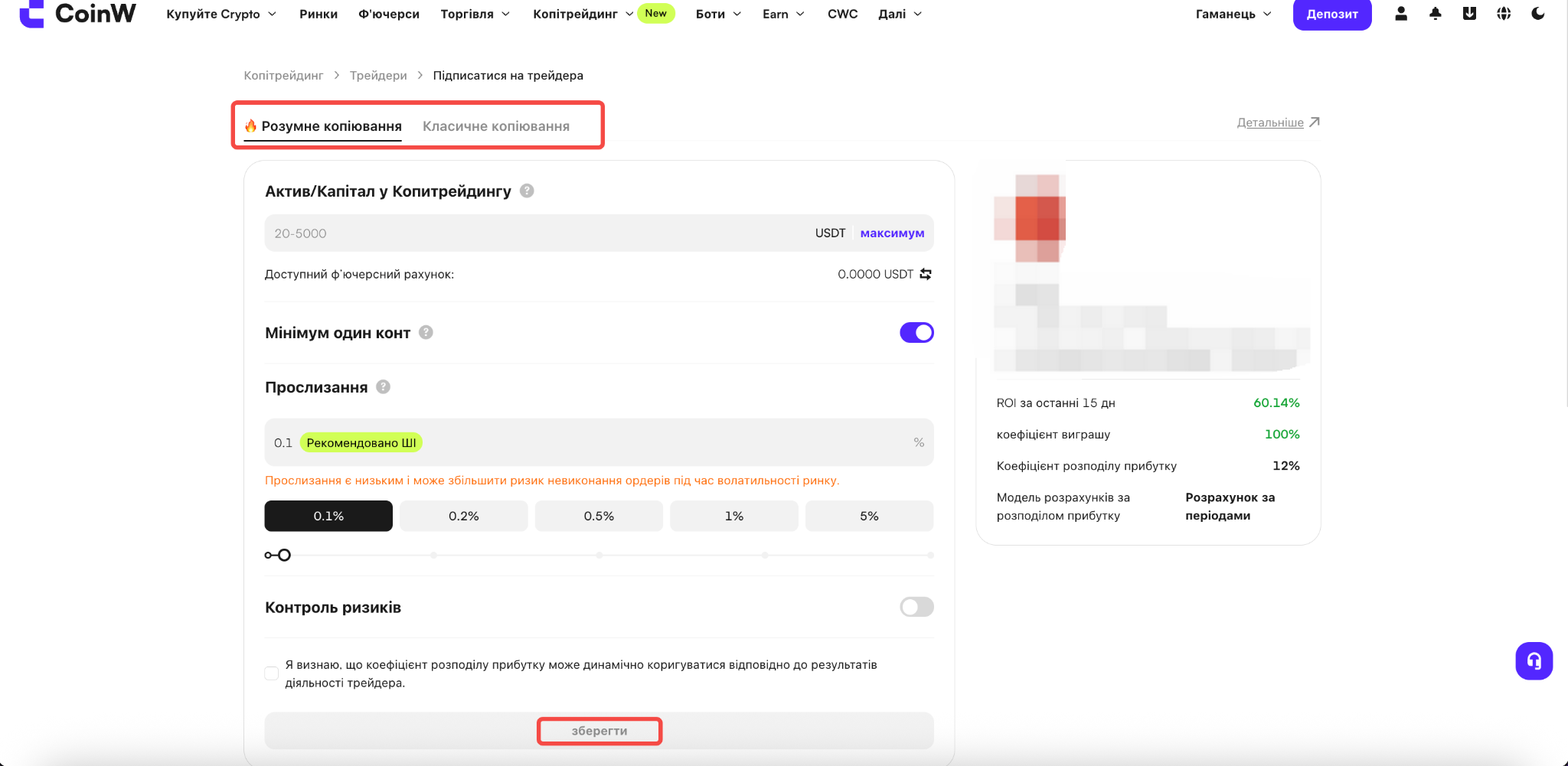
Заповніть необхідні параметри на сторінці, щоб розпочати копіювання угод обраного трейдера.
Капітал для копіювання
Доступний діапазон капіталу визначається лід-трейдером, а максимальна сума не перевищує 5 000 USDT. Це максимальний капітал, який можна виділити для копіювання поточного трейдера. Прибуток, отриманий від копітрейдингу, також враховується в цій сумі. Після досягнення ліміту додаткові кошти більше не можна буде переказати, однак це не вплине на поточні угоди чи активи.
Мінімум 1 контракт
Після ввімкнення функції «Мінімум 1 контракт», якщо розрахована відповідно до пропорції коштів маржа недостатня для відкриття одного контракту, система автоматично відкриє 1 контракт щоразу, коли лід-трейдер відкриває нову позицію.
Налаштування прослизання при відкритті позиції
Встановлене вами значення прослизання безпосередньо впливає на результати копітрейдингу. Система не відкриватиме ордери, якщо відхилення ціни перевищує встановлене максимальне значення прослизання. Це гарантує відкриття позицій лише в межах прийнятного для вас діапазону цін. Якщо ж значення прослизання встановлено занадто низьким, під час високої волатильності ринку ордер може не виконатися.
Контроль ризиків (необов'язково)
Ви можете налаштувати:
співвідношення Take Profit / Stop Loss;
співвідношення Stop Loss для субрахунку копітрейдингу;
максимальний розмір позиції.
Класичне копіювання
Заповніть необхідні параметри на сторінці, щоб розпочати копіювання угод обраного трейдера.
Капітал для копіювання
Доступний діапазон капіталу визначається лід-трейдером, а максимальна сума не перевищує 5 000 USDT. Це максимальний капітал, який можна виділити для копіювання поточного трейдера. Прибуток, отриманий від копітрейдингу, також враховується в цій сумі. Після досягнення ліміту додаткові кошти більше не можна буде переказати, однак це не вплине на поточні угоди чи активи.
Сума на одну угоду
Маржу для кожної угоди можна налаштувати як фіксовану суму або множник.
Фіксована сума — для кожної скопійованої угоди використовується вказана вами сума маржі.
Множник — маржа розраховується як множник від маржі лід-трейдера.
Діапазон, що відображається в полі введення, відповідає лімітам маржі на одну угоду, встановленим лід-трейдером. Якщо вказана сума менша за мінімально допустиму, копіювання не буде виконано. Якщо сума перевищує максимальний ліміт, система автоматично використає максимально допустиме значення.
Автоматично копіювати нові торгові пари
Автоматично копіювати угоди за новими торговими парами, які почне використовувати лід-трейдер.
Торгові пари для копіювання
Ви можете самостійно вибрати, які торгові пари копіювати.
Режим позиції
Можна використовувати режим позиції лід-трейдера або налаштувати власний.
Налаштування прослизання при відкритті позиції
Встановлене вами значення прослизання безпосередньо впливає на результати копітрейдингу. Система не відкриватиме ордери, якщо відхилення ціни перевищує встановлене максимальне значення прослизання. Це гарантує відкриття позицій лише в межах прийнятного для вас діапазону цін. Якщо ж значення прослизання встановлено занадто низьким, під час високої волатильності ринку ордер може не виконатися.
Контроль ризиків (необов'язково)
Ви можете налаштувати:
співвідношення Take Profit / Stop Loss;
співвідношення Stop Loss для субрахунку копітрейдингу;
максимальний розмір позиції.
【WEB】
(1) Перейдіть на сторінку ф'ючерсного копітрейдингу:
https://www.coinw.com/uk_UA/copy-trading/futures
На цій сторінці відображається список ф'ючерсних лід-трейдерів. Ви можете вибрати трейдера відповідно до свого стилю торгівлі (довгострокова або короткострокова стратегія) або зі списку Популярні трейдери.
(2) Виберіть потрібного трейдера та натисніть кнопку «Копіювати».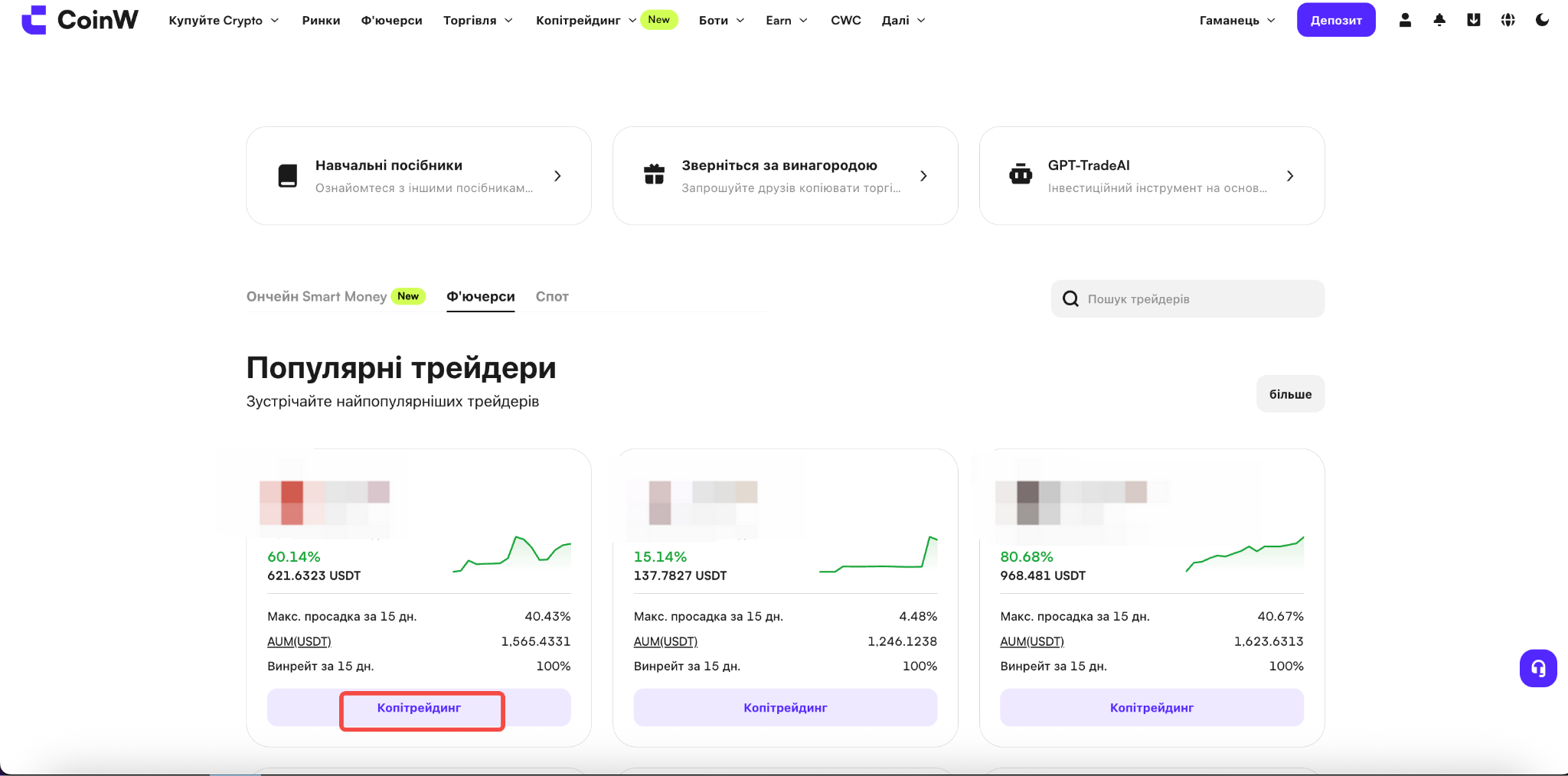
(3) На сторінці копітрейдингу виберіть режим Класичне копіювання або Розумне пропорційне копіювання. Після заповнення необхідних параметрів копіювання буде активовано.
Детальний опис усіх параметрів наведено в розділі «Опис параметрів режимів копітрейдингу» вище.
【APP】
(1) Відкрийте головну сторінку застосунку та натисніть «Копітрейдинг».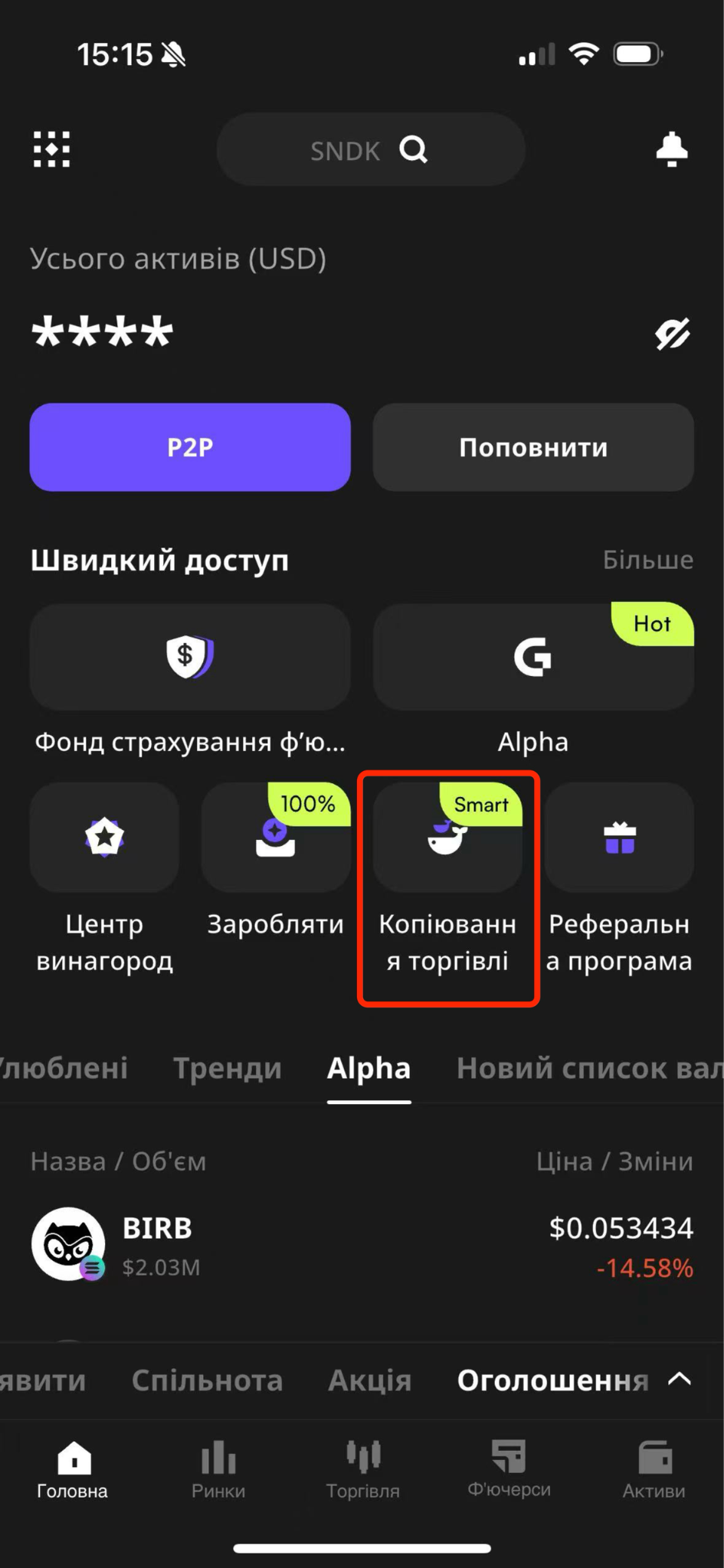
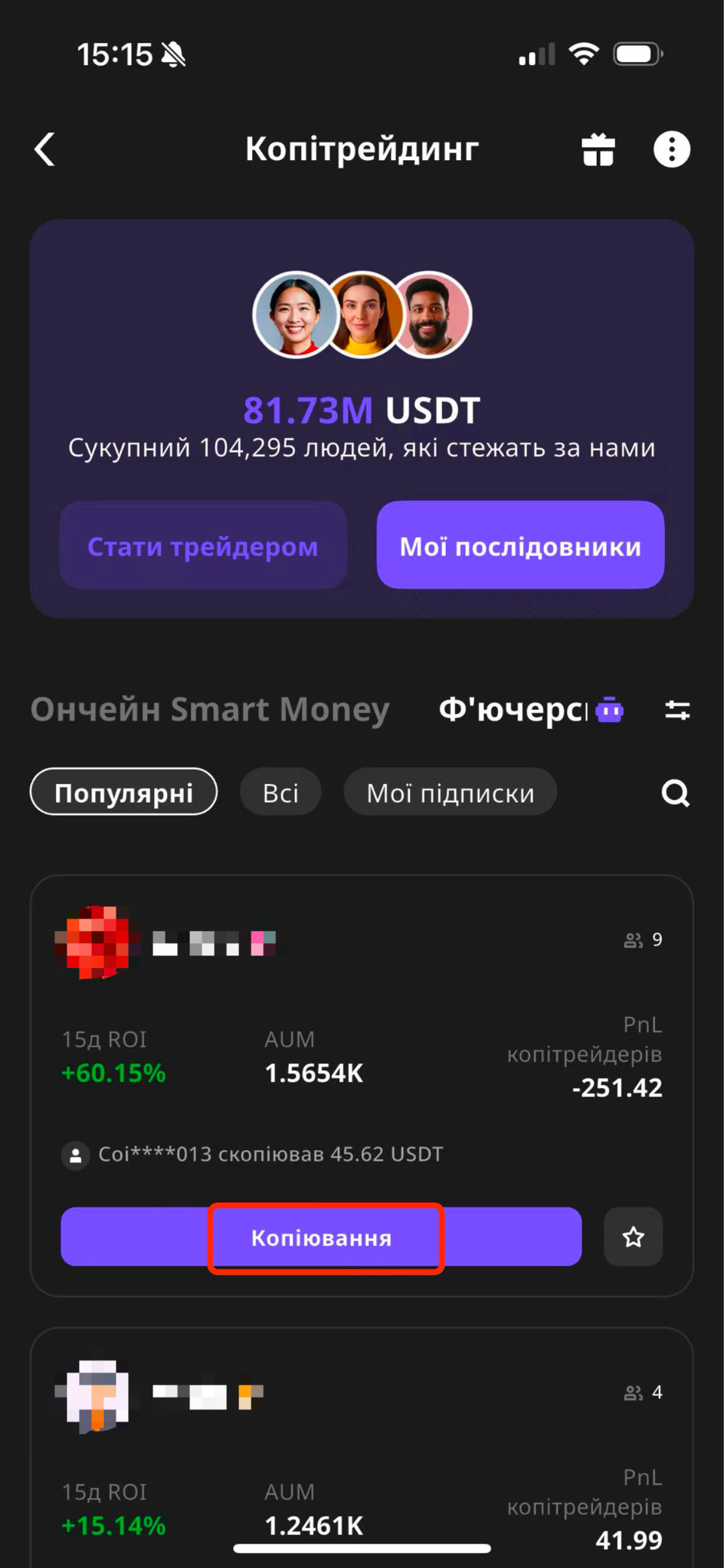
(2) Виберіть «Ф'ючерсний копітрейдинг», знайдіть потрібного трейдера та натисніть «Копіювати».
(3) На сторінці копітрейдингу виберіть режим Класичне копіювання або Розумне пропорційне копіювання. Після заповнення необхідних параметрів копіювання буде активовано.
Детальний опис усіх параметрів наведено в розділі «Опис параметрів режимів копітрейдингу» вище.
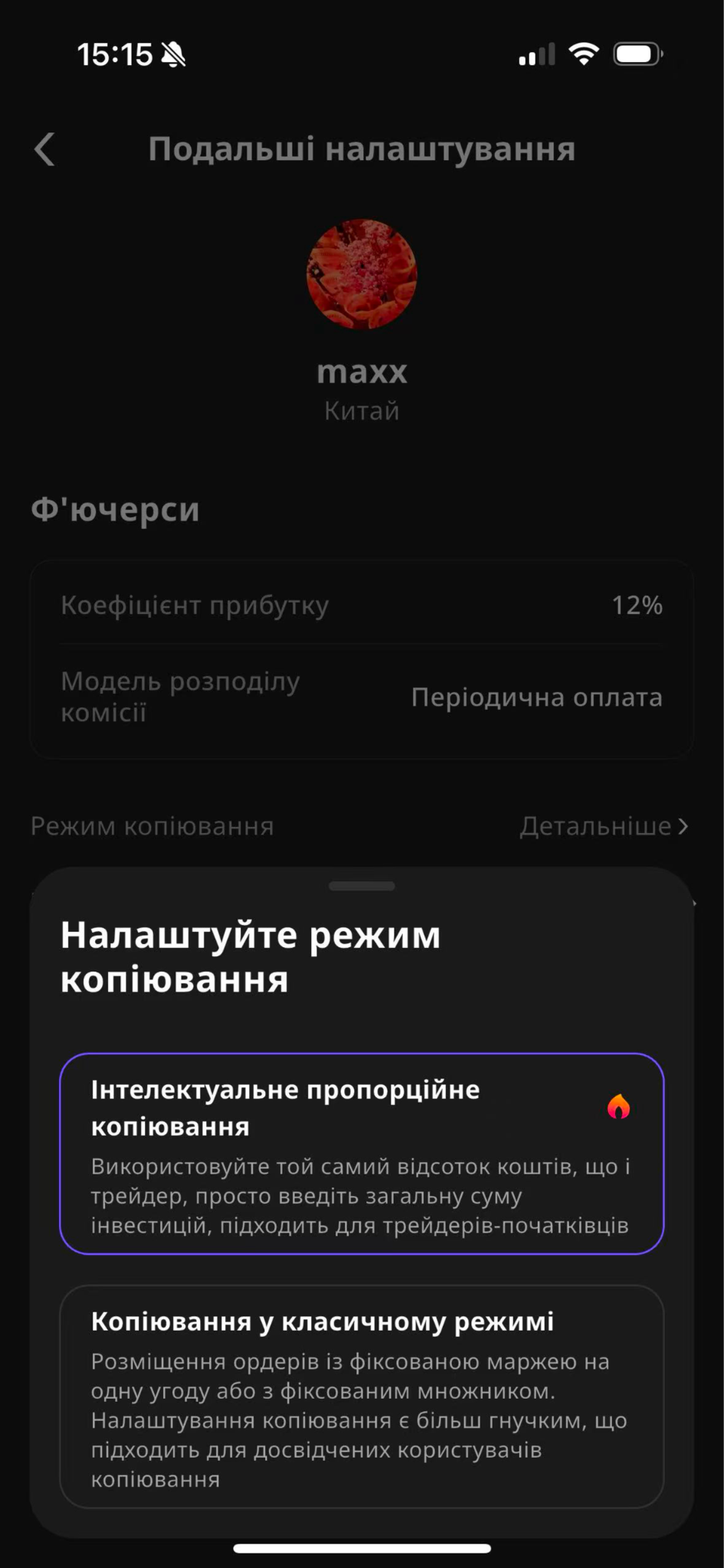
Перед початком копітрейдингу ознайомтеся з двома режимами копіювання
Розумне пропорційне копіювання
Достатньо вказати суму інвестицій, після чого система автоматично копіюватиме угоди лід-трейдера пропорційно до співвідношення вкладених ним коштів.
Класичне копіювання
Користувач самостійно налаштовує капітал для копіювання та суму маржі для кожної угоди, що забезпечує більш гнучкі та персоналізовані налаштування копітрейдингу.
Опис параметрів режимів копітрейдингу
Розумне пропорційне копіювання
Заповніть необхідні параметри на сторінці, щоб розпочати копіювання угод обраного трейдера.
Капітал для копіювання
Доступний діапазон капіталу визначається лід-трейдером, а максимальна сума не перевищує 5 000 USDT. Це максимальний капітал, який можна виділити для копіювання поточного трейдера. Прибуток, отриманий від копітрейдингу, також враховується в цій сумі. Після досягнення ліміту додаткові кошти більше не можна буде переказати, однак це не вплине на поточні угоди чи активи.
Мінімум 1 контракт
Після ввімкнення функції «Мінімум 1 контракт», якщо розрахована відповідно до пропорції коштів маржа недостатня для відкриття одного контракту, система автоматично відкриє 1 контракт щоразу, коли лід-трейдер відкриває нову позицію.
Налаштування прослизання при відкритті позиції
Встановлене вами значення прослизання безпосередньо впливає на результати копітрейдингу. Система не відкриватиме ордери, якщо відхилення ціни перевищує встановлене максимальне значення прослизання. Це гарантує відкриття позицій лише в межах прийнятного для вас діапазону цін. Якщо ж значення прослизання встановлено занадто низьким, під час високої волатильності ринку ордер може не виконатися.
Контроль ризиків (необов'язково)
Ви можете налаштувати:
співвідношення Take Profit / Stop Loss;
співвідношення Stop Loss для субрахунку копітрейдингу;
максимальний розмір позиції.
Класичне копіювання
Заповніть необхідні параметри на сторінці, щоб розпочати копіювання угод обраного трейдера.
Капітал для копіювання
Доступний діапазон капіталу визначається лід-трейдером, а максимальна сума не перевищує 5 000 USDT. Це максимальний капітал, який можна виділити для копіювання поточного трейдера. Прибуток, отриманий від копітрейдингу, також враховується в цій сумі. Після досягнення ліміту додаткові кошти більше не можна буде переказати, однак це не вплине на поточні угоди чи активи.
Сума на одну угоду
Маржу для кожної угоди можна налаштувати як фіксовану суму або множник.
Фіксована сума — для кожної скопійованої угоди використовується вказана вами сума маржі.
Множник — маржа розраховується як множник від маржі лід-трейдера.
Діапазон, що відображається в полі введення, відповідає лімітам маржі на одну угоду, встановленим лід-трейдером. Якщо вказана сума менша за мінімально допустиму, копіювання не буде виконано. Якщо сума перевищує максимальний ліміт, система автоматично використає максимально допустиме значення.
Автоматично копіювати нові торгові пари
Автоматично копіювати угоди за новими торговими парами, які почне використовувати лід-трейдер.
Торгові пари для копіювання
Ви можете самостійно вибрати, які торгові пари копіювати.
Режим позиції
Можна використовувати режим позиції лід-трейдера або налаштувати власний.
Налаштування прослизання при відкритті позиції
Встановлене вами значення прослизання безпосередньо впливає на результати копітрейдингу. Система не відкриватиме ордери, якщо відхилення ціни перевищує встановлене максимальне значення прослизання. Це гарантує відкриття позицій лише в межах прийнятного для вас діапазону цін. Якщо ж значення прослизання встановлено занадто низьким, під час високої волатильності ринку ордер може не виконатися.
Контроль ризиків (необов'язково)
Ви можете налаштувати:
співвідношення Take Profit / Stop Loss;
співвідношення Stop Loss для субрахунку копітрейдингу;
максимальний розмір позиції.
【WEB】
(1) Перейдіть на сторінку ф'ючерсного копітрейдингу:
https://www.coinw.com/uk_UA/copy-trading/futures
На цій сторінці відображається список ф'ючерсних лід-трейдерів. Ви можете вибрати трейдера відповідно до свого стилю торгівлі (довгострокова або короткострокова стратегія) або зі списку Популярні трейдери.
(2) Виберіть потрібного трейдера та натисніть кнопку «Копіювати».
(3) На сторінці копітрейдингу виберіть режим Класичне копіювання або Розумне пропорційне копіювання. Після заповнення необхідних параметрів копіювання буде активовано.
Детальний опис усіх параметрів наведено в розділі «Опис параметрів режимів копітрейдингу» вище.
【APP】
(1) Відкрийте головну сторінку застосунку та натисніть «Копітрейдинг».
(2) Виберіть «Ф'ючерсний копітрейдинг», знайдіть потрібного трейдера та натисніть «Копіювати».
(3) На сторінці копітрейдингу виберіть режим Класичне копіювання або Розумне пропорційне копіювання. Після заповнення необхідних параметрів копіювання буде активовано.
Детальний опис усіх параметрів наведено в розділі «Опис параметрів режимів копітрейдингу» вище.