お知らせセンター

Operation Process of Google Authentication
公開日:2021/09/18 02:45|最終更新日:2025/01/01 15:31

What is Google Authentication?

Google Authenticator provides a 6-digit one-time password to further encrypt your asset and protect its security when login, deposit, and etc. after opening the Google Authenticator 2FA.

Opening Google Authenticator 2FA is a simple step, but has a profound effect on your CoinW account.


How to Operate

WEB

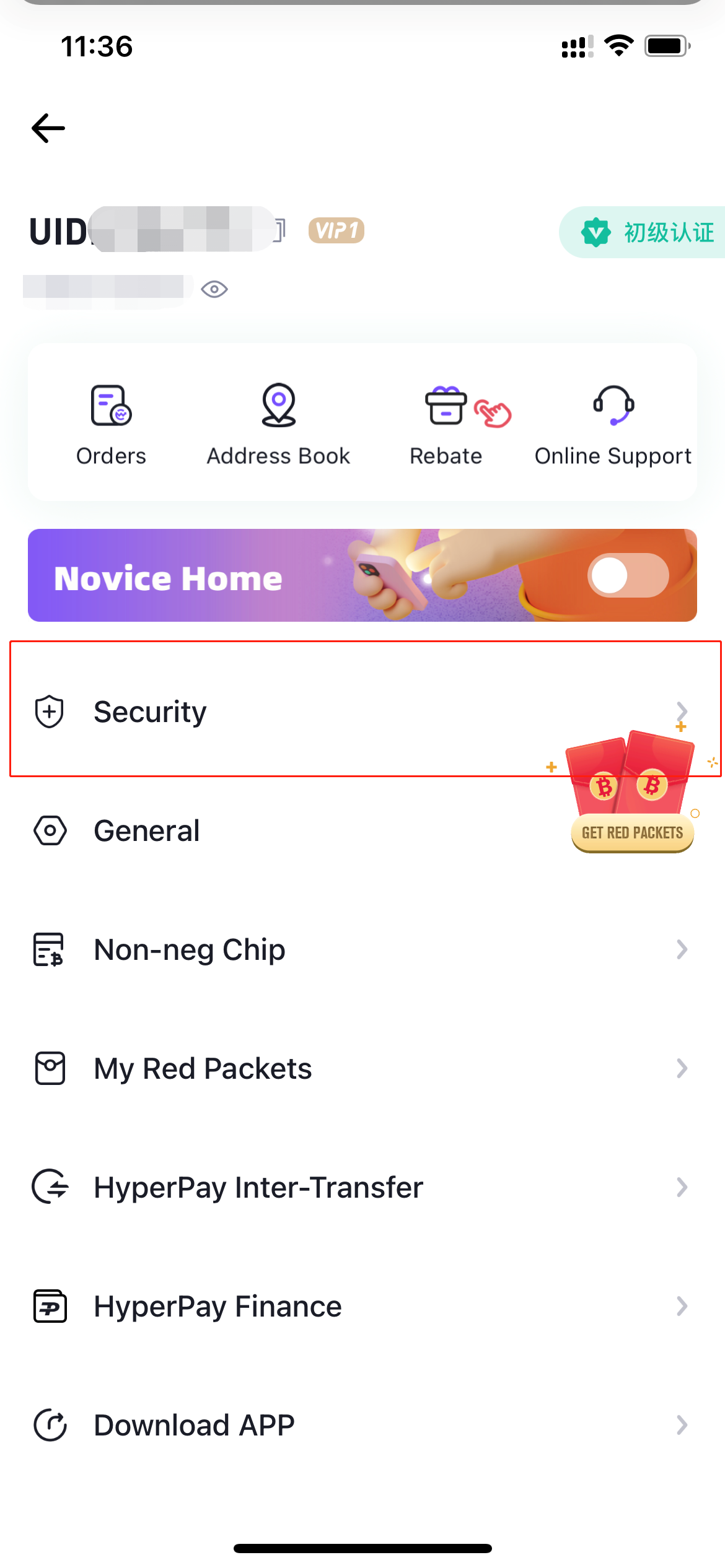
1. Log into CoinW website on PC, move the cursor on the avatar at the upper right corner, and click "Account&Security".
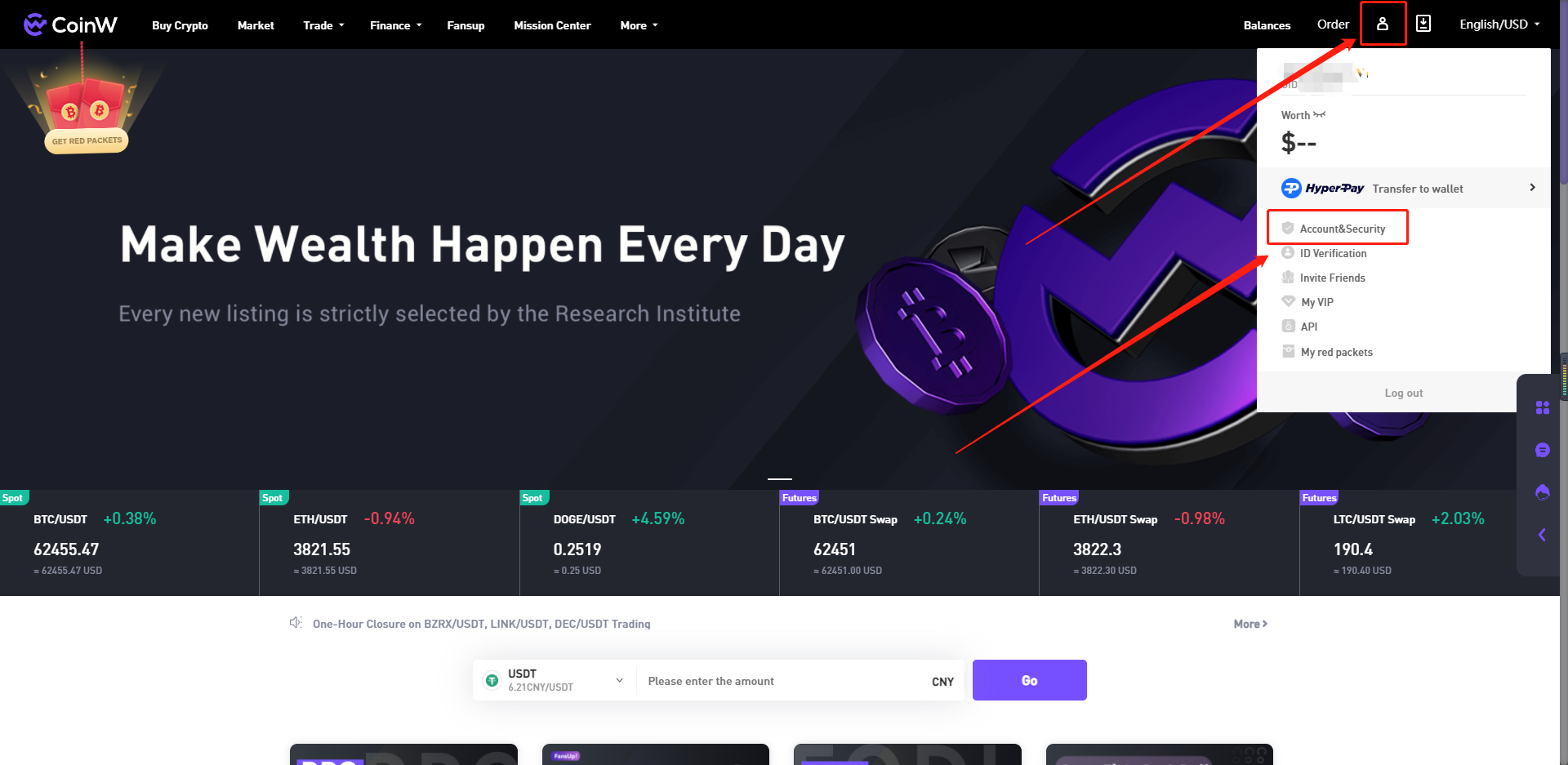
image.png


2. Choose and click "Google Authenticator", and then justy follow system prompts to complete the operation.
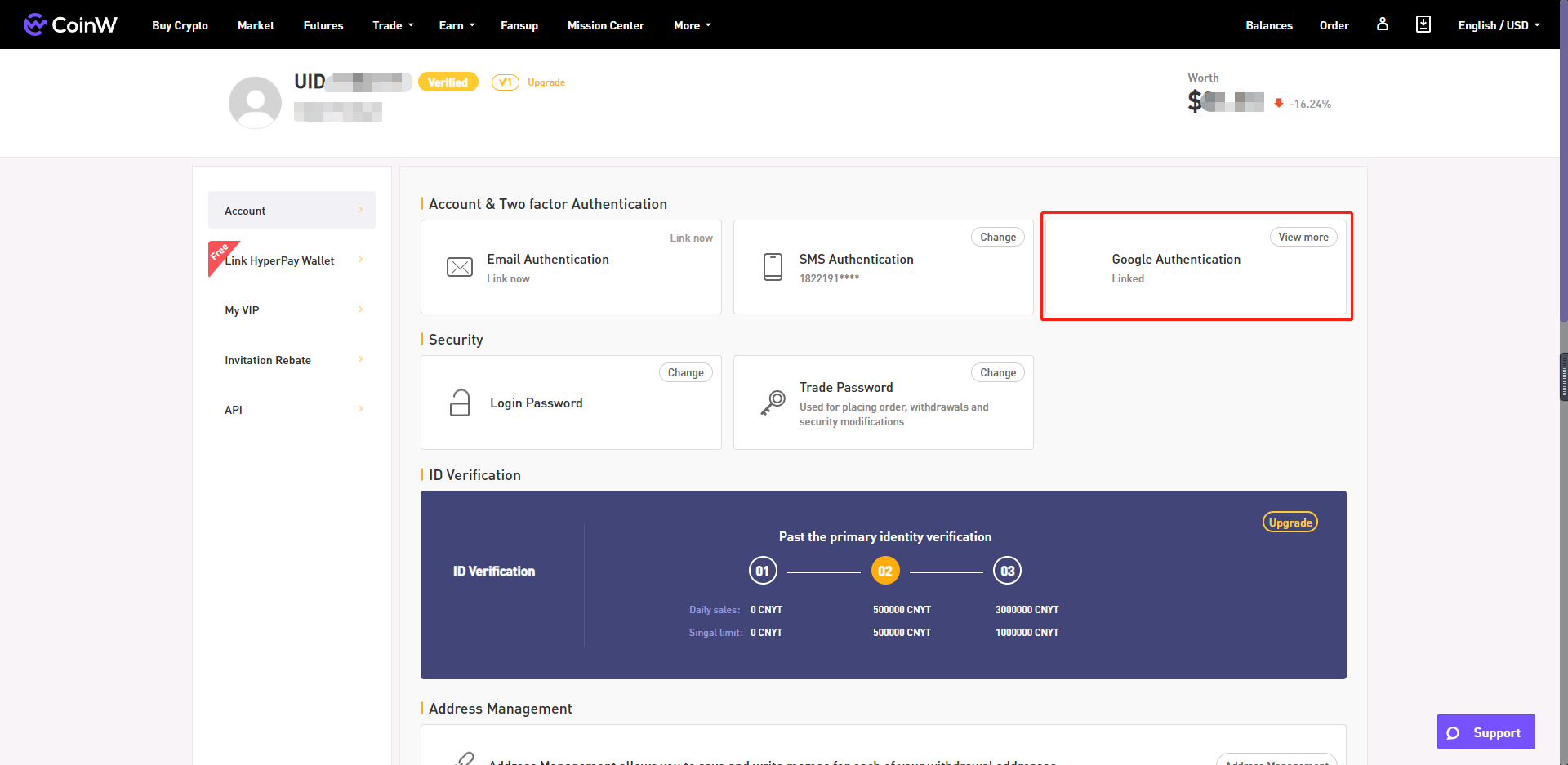
image__1_.png


APP
  1. Log into CoinW App on the mobile device, click the avatar at the upper left corner.
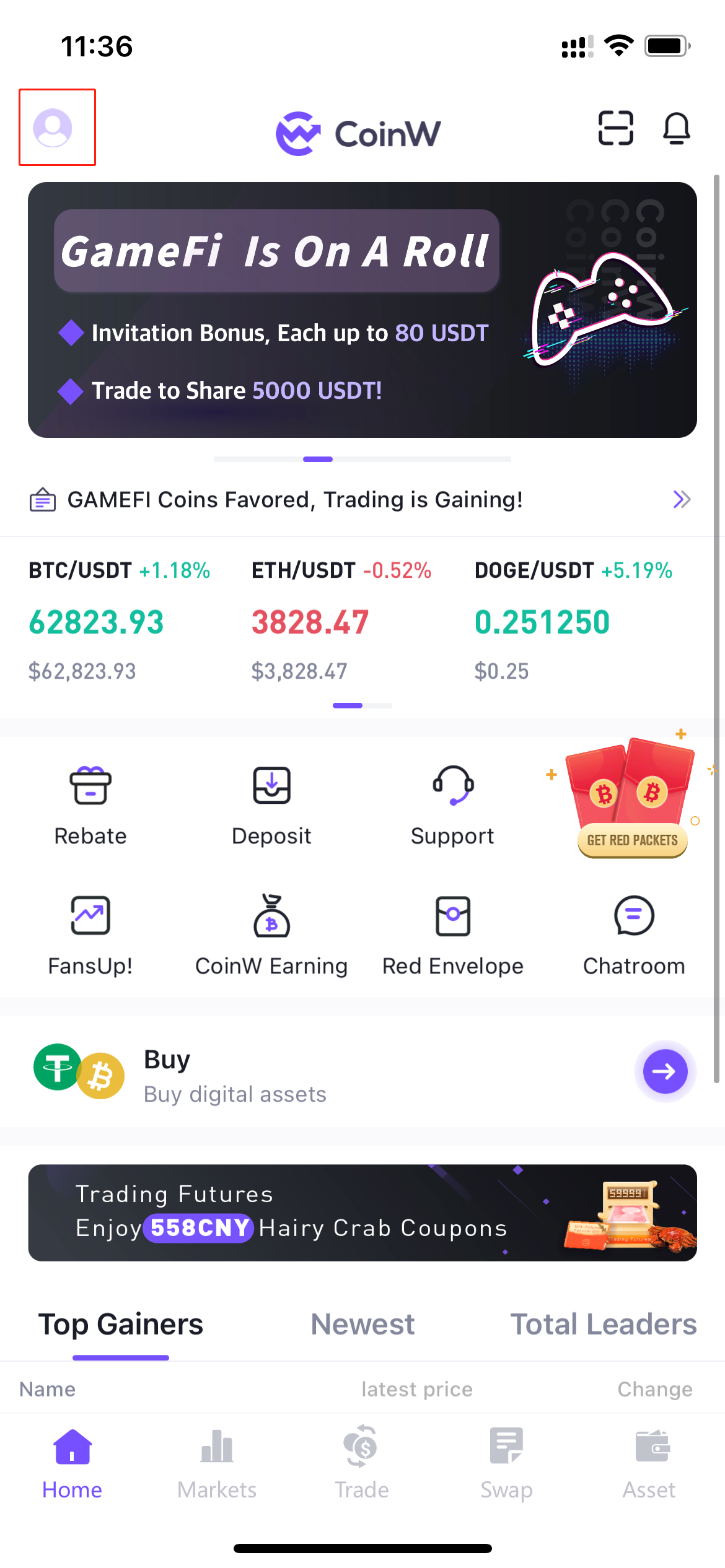
image__2_.png


2. Click "Security".

image__3_.png


3. Choose and click "Google Authenticator", and then justy follow system prompts to complete the operation.
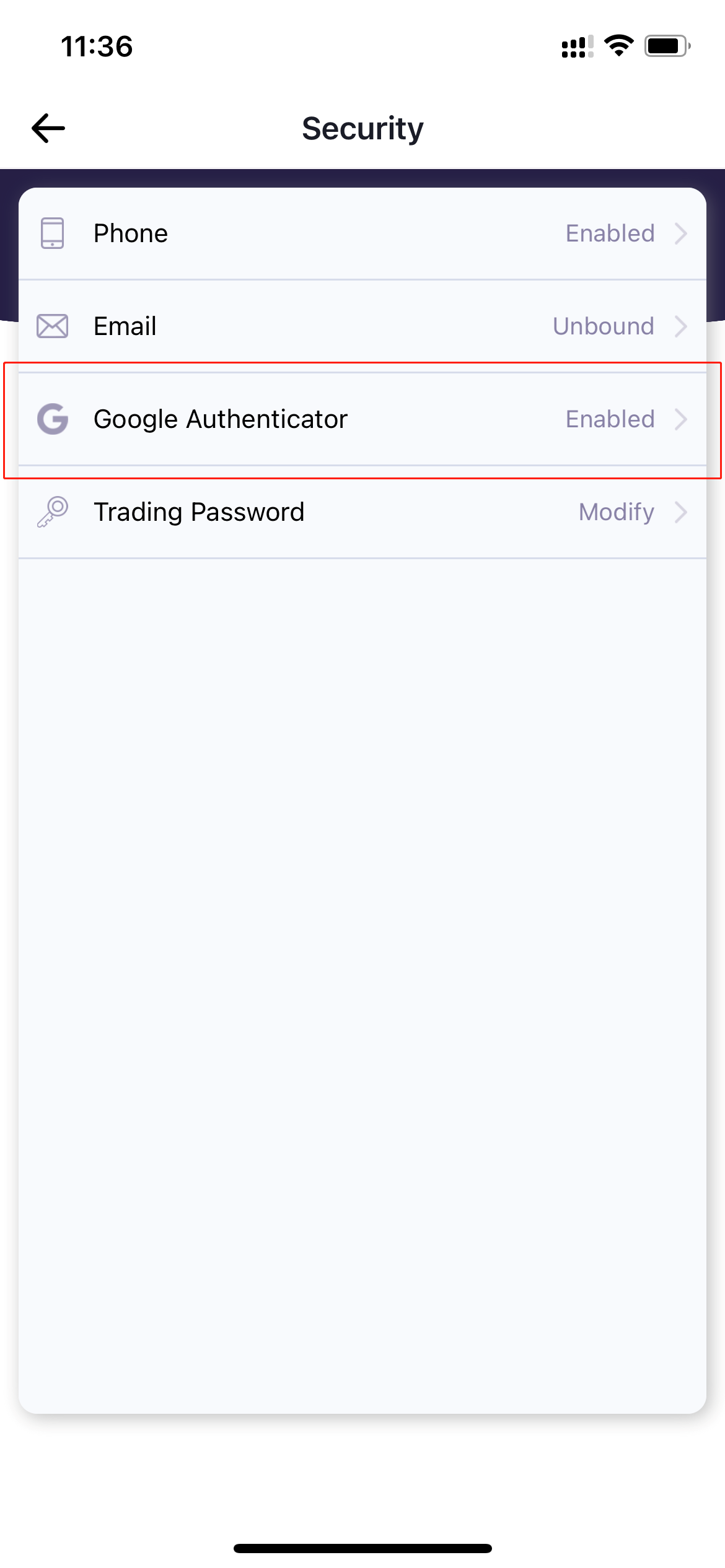
image__4_.png


About Google Authenticator

1. Download Google Authenticator

For iOS users, just search "Google Authenticator" in the App Store.

For Android users, you can contact our customer service for the download link.


2. Solutions to Fail to Link Google 2FA

Several tips for linking Google 2FA:

Please make sure that you download the right "Google Authenticator" on your phone;

Please make sure that the time on your phone is consistent with the time on the device which runs CoinW;

Please make sure that the login password and Google code entered on the linking page are correct.


 3. Unlink Google 2FA

In order to keep your account safe, it requires you to provide:

UID, photo of you with hand holding the front side of ID + handwriting prove;

Handwriting prove: I want to close CoinW Google 2FA on (date of the day), because (reasons).

If you haven't performed the identity verification when you unlink Google 2FA, please login and perform it as soon as possible: https://www.coinw.ai/user/security.html

現在、このコンテンツは英語版のみ提供されています。日本語版はまだご利用いただけません。
この記事はお役に立ちましたか?
0 / 0人が役に立つと答えています
【期間限定】新規ユーザー特典!
今すぐ登録して、12000 USDTの限定特典パックを受け取ろう!
すでにアカウントをお持ちの方はこちらログイン
人気記事
Operation Process of Google Authentication
公開日:2021/09/18 02:45|最終更新日:2025/01/01 15:31

What is Google Authentication?

Google Authenticator provides a 6-digit one-time password to further encrypt your asset and protect its security when login, deposit, and etc. after opening the Google Authenticator 2FA.

Opening Google Authenticator 2FA is a simple step, but has a profound effect on your CoinW account.


How to Operate

WEB

1. Log into CoinW website on PC, move the cursor on the avatar at the upper right corner, and click "Account&Security".

image.png


2. Choose and click "Google Authenticator", and then justy follow system prompts to complete the operation.

image__1_.png


APP
  1. Log into CoinW App on the mobile device, click the avatar at the upper left corner.

image__2_.png


2. Click "Security".

image__3_.png


3. Choose and click "Google Authenticator", and then justy follow system prompts to complete the operation.

image__4_.png


About Google Authenticator

1. Download Google Authenticator

For iOS users, just search "Google Authenticator" in the App Store.

For Android users, you can contact our customer service for the download link.


2. Solutions to Fail to Link Google 2FA

Several tips for linking Google 2FA:

Please make sure that you download the right "Google Authenticator" on your phone;

Please make sure that the time on your phone is consistent with the time on the device which runs CoinW;

Please make sure that the login password and Google code entered on the linking page are correct.


 3. Unlink Google 2FA

In order to keep your account safe, it requires you to provide:

UID, photo of you with hand holding the front side of ID + handwriting prove;

Handwriting prove: I want to close CoinW Google 2FA on (date of the day), because (reasons).

If you haven't performed the identity verification when you unlink Google 2FA, please login and perform it as soon as possible: https://www.coinw.ai/user/security.html

現在、このコンテンツは英語版のみ提供されています。日本語版はまだご利用いただけません。
この記事はお役に立ちましたか?
0 / 0人が役に立つと答えています
【期間限定】新規ユーザー特典!
今すぐ登録して、12000 USDTの限定特典パックを受け取ろう!
すでにアカウントをお持ちの方はこちらログイン
人気記事