よくある質問
This guide provides a step-by-step walkthrough for purchasing cryptocurrency on the CoinW P2P marketplace. Please follow the steps below to complete your purchase securely and efficiently.
How to Buy USDT
WEB
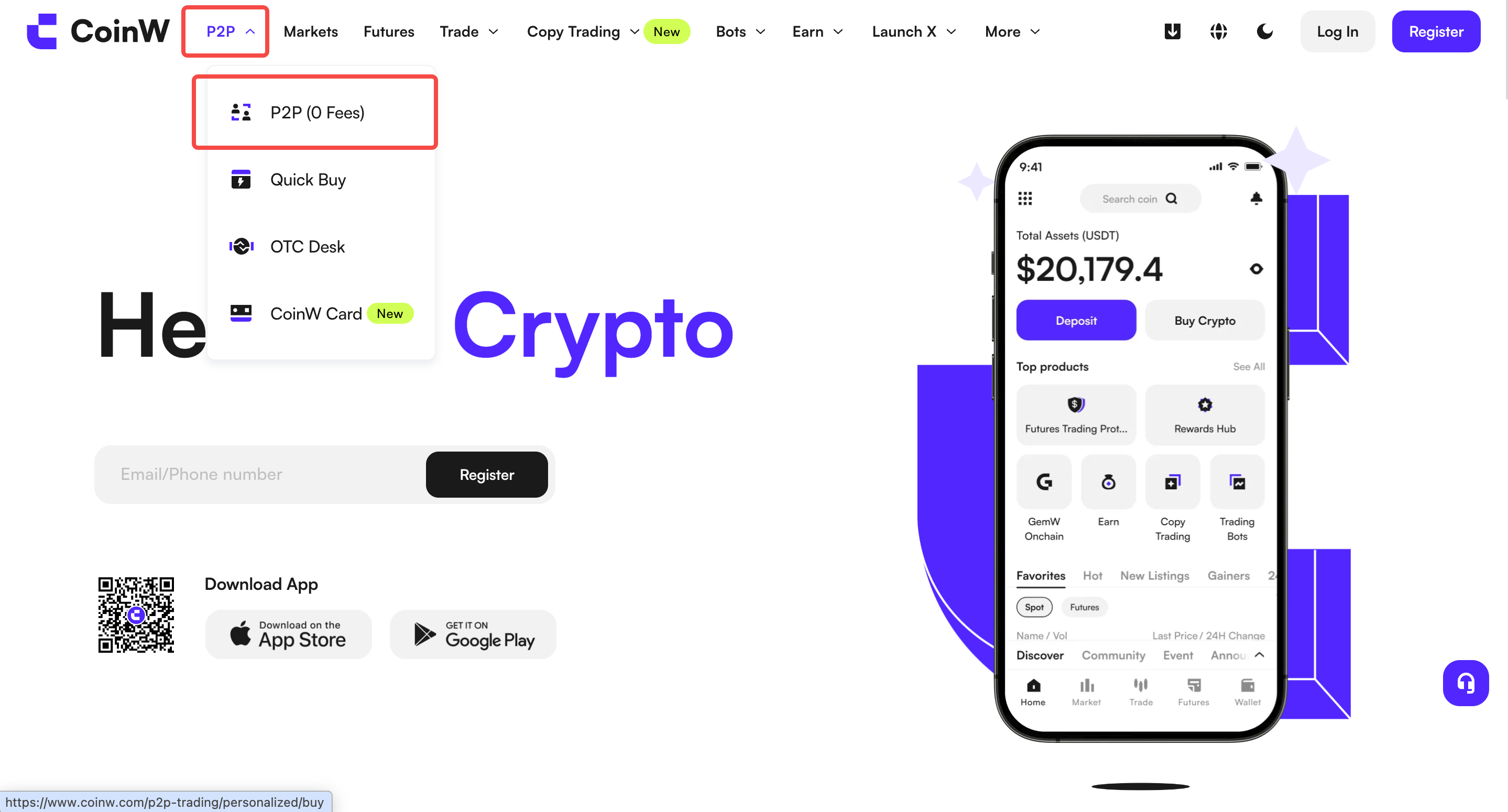
Step 1 :Log in to the official CoinW website. Hover over the “P2P” button at the top and select “P2P Trading” to enter the fiat trading page.
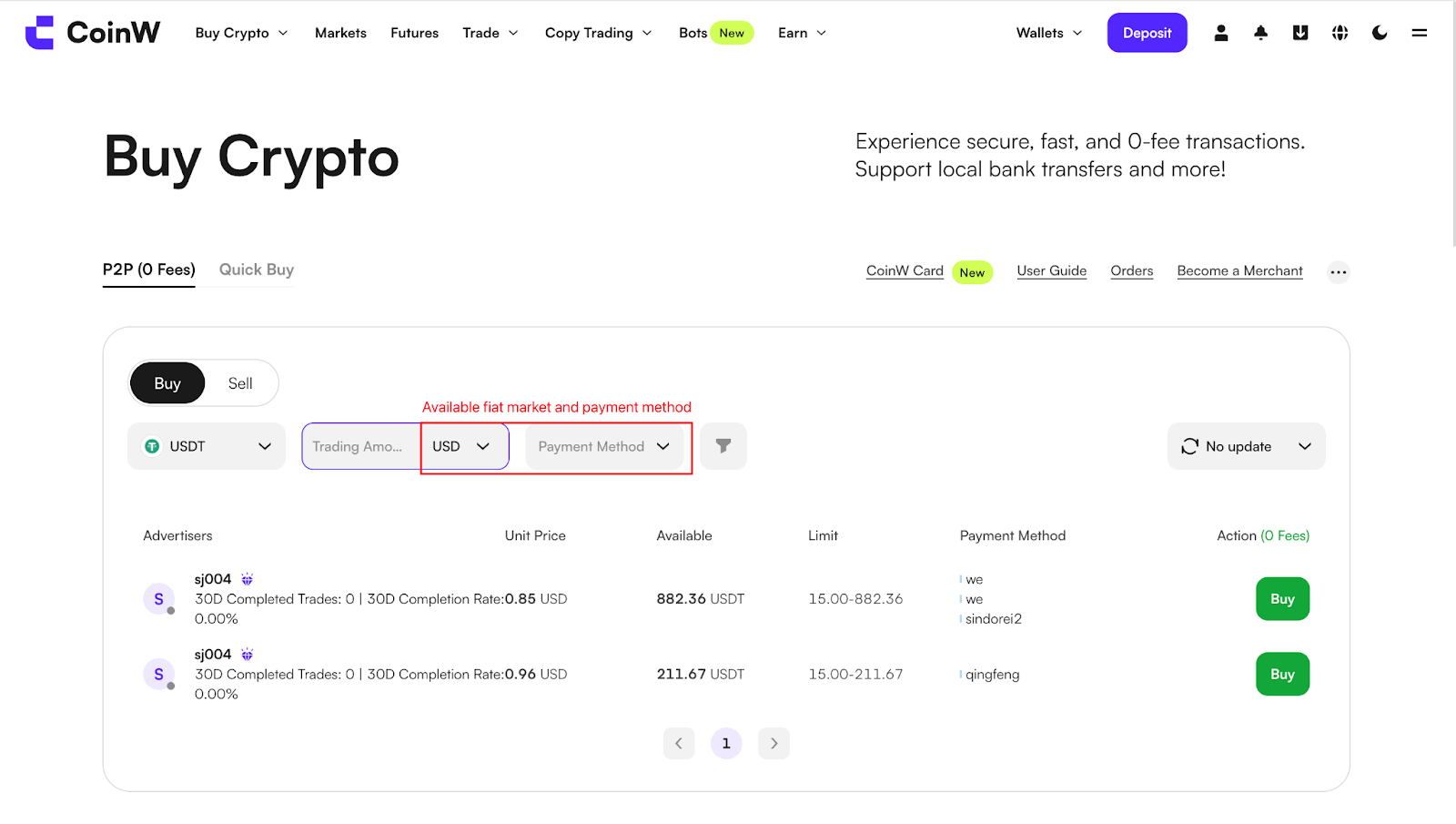
Step 2 :After entering the buy page, click the “Buy” button at the top to view the list of merchant ads currently available.
You may use the filters at the top to find a suitable merchant. Once selected, click “Buy USDT” next to the ad to place an order.
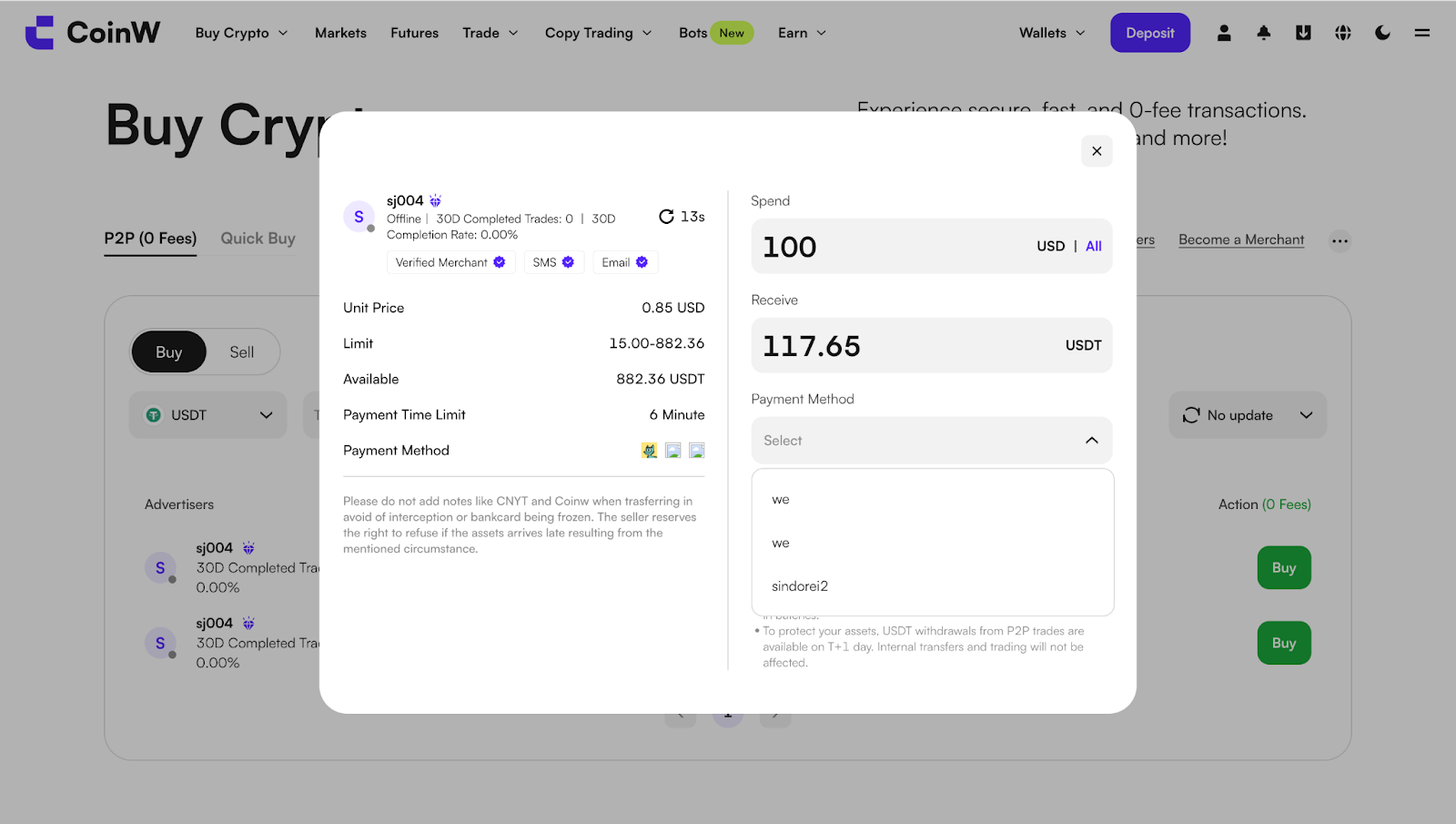
Step 3:Enter the amount or quantity you wish to purchase and click Buy.
You will then see the order details, including the order number, order amount, and payment duration.
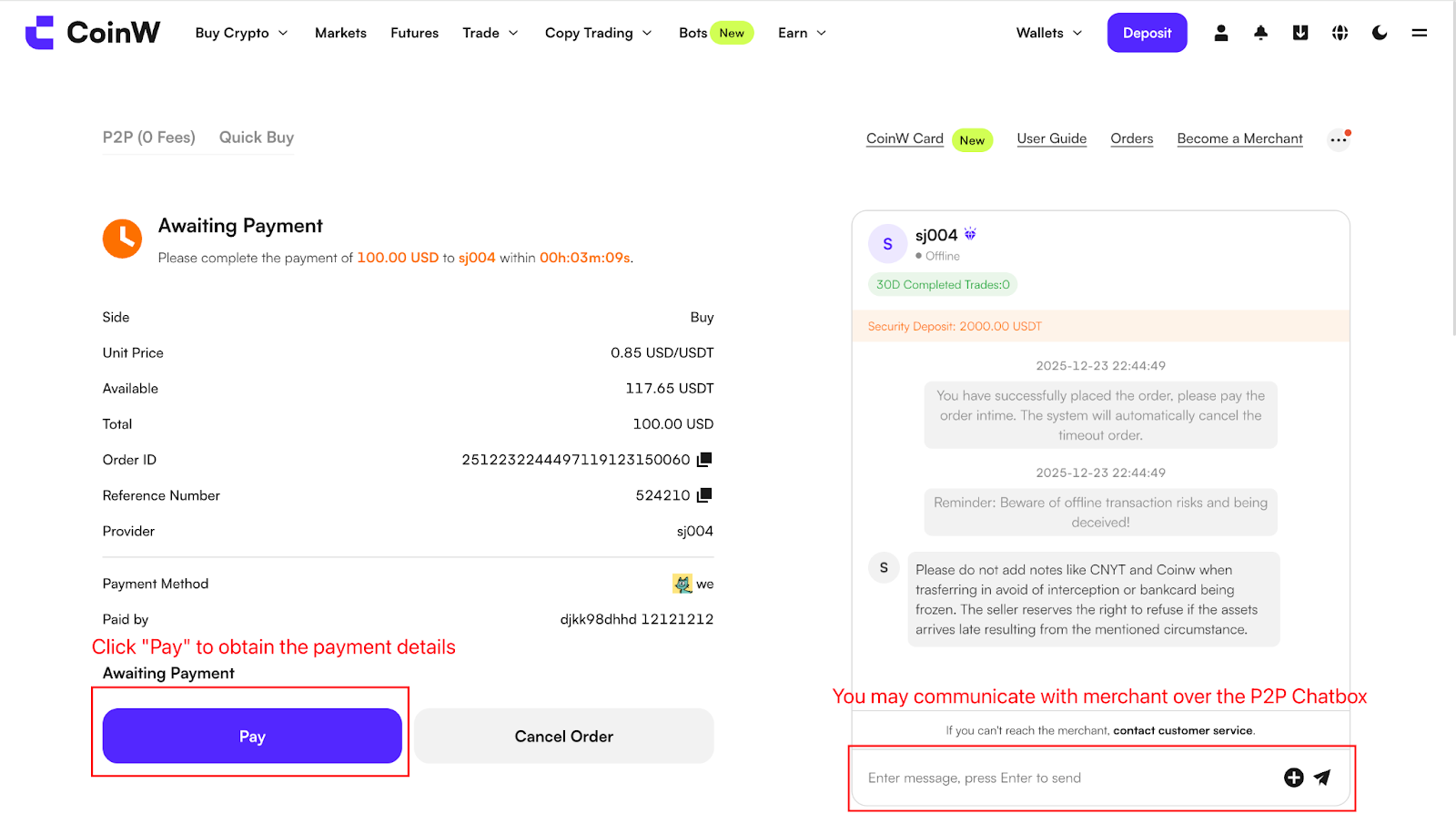
Step 4 : Select your preferred payment method and click “Pay” to obtain the seller’s payment information.
After confirming the details, transfer the exact order amount to the seller.
Important Notes:
Please transfer the payment directly to the seller using their specified payment method.
Do not click [Cancel Order] unless you have already received a refund from the seller.
Do not click [Mark as Paid] before completing the payment.
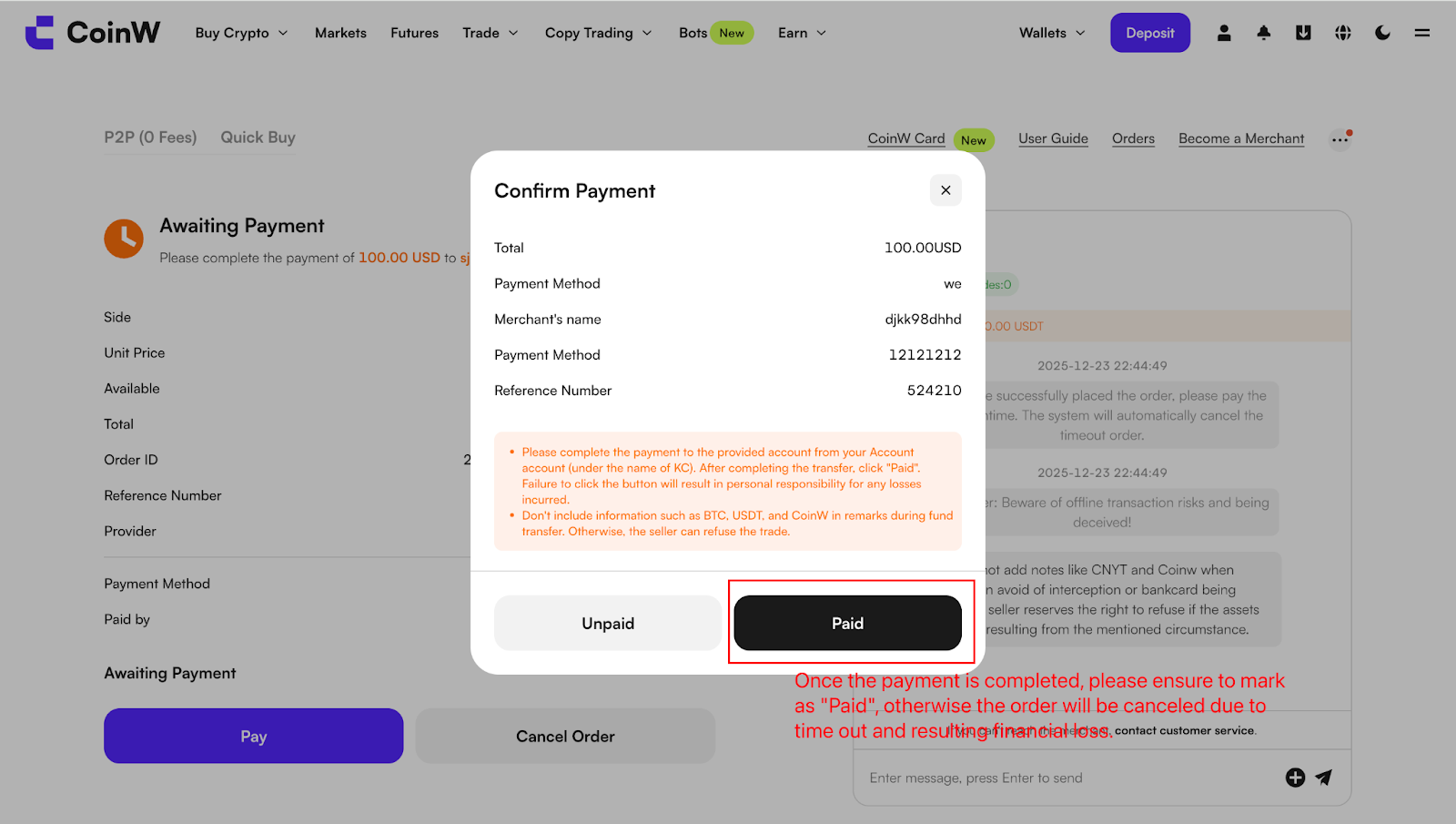
Step 5 : After completing the transfer, be sure to click “Mark as Paid”.
The order will then be sent to the seller. Once the seller confirms receipt of payment, the cryptocurrency will be released to your account.
Step 6 : You can view the received USDT in your P2P Account Wallet.
Frequently Asked Questions (FAQs)
1. What should I do if the seller doesn’t release the cryptocurrency?
Make sure you have clicked [Mark as Paid] after completing the transfer.
If the seller does not release the cryptocurrency within the specified time, click [Appeal] to report the issue to CoinW.
2. Can I cancel an order after placing it?
Yes, you can cancel an order if payment has not been made.
Repeated cancellations may negatively affect your P2P trading experience.
3. Are there fees for P2P transactions?
CoinW does not charge any P2P transaction fees.
However, additional fees may apply depending on your payment method or bank.
4. Why is it important to set up payment methods?
Setting up and verifying payment methods ensures smoother transactions and helps meet sellers’ requirements.
5. Can I use a third-party payment account?
No. For security reasons, the payment account name must match the name verified on your CoinW account.
This guide provides a step-by-step walkthrough for purchasing cryptocurrency on the CoinW P2P marketplace. Please follow the steps below to complete your purchase securely and efficiently.
How to Buy USDT
WEB
Step 1 :Log in to the official CoinW website. Hover over the “P2P” button at the top and select “P2P Trading” to enter the fiat trading page.
Step 2 :After entering the buy page, click the “Buy” button at the top to view the list of merchant ads currently available.
You may use the filters at the top to find a suitable merchant. Once selected, click “Buy USDT” next to the ad to place an order.
Step 3:Enter the amount or quantity you wish to purchase and click Buy.
You will then see the order details, including the order number, order amount, and payment duration.
Step 4 : Select your preferred payment method and click “Pay” to obtain the seller’s payment information.
After confirming the details, transfer the exact order amount to the seller.
Important Notes:
Please transfer the payment directly to the seller using their specified payment method.
Do not click [Cancel Order] unless you have already received a refund from the seller.
Do not click [Mark as Paid] before completing the payment.
Step 5 : After completing the transfer, be sure to click “Mark as Paid”.
The order will then be sent to the seller. Once the seller confirms receipt of payment, the cryptocurrency will be released to your account.
Step 6 : You can view the received USDT in your P2P Account Wallet.
Frequently Asked Questions (FAQs)
1. What should I do if the seller doesn’t release the cryptocurrency?
Make sure you have clicked [Mark as Paid] after completing the transfer.
If the seller does not release the cryptocurrency within the specified time, click [Appeal] to report the issue to CoinW.
2. Can I cancel an order after placing it?
Yes, you can cancel an order if payment has not been made.
Repeated cancellations may negatively affect your P2P trading experience.
3. Are there fees for P2P transactions?
CoinW does not charge any P2P transaction fees.
However, additional fees may apply depending on your payment method or bank.
4. Why is it important to set up payment methods?
Setting up and verifying payment methods ensures smoother transactions and helps meet sellers’ requirements.
5. Can I use a third-party payment account?
No. For security reasons, the payment account name must match the name verified on your CoinW account.