Understanding CoinW KYC Requirements: Privacy & Compliance
KYC (Know Your Customer) is an identity verification process used across financial services to confirm who is using an account and to reduce compliance and security risks. CoinW’s Help Center explains that its identity verification procedures are established with AML (Anti-Money Laundering), KYC, and CTF (Counter-Terrorism Financing) considerations in mind, and that verification is organized into levels with different privileges.
Official CoinW References
For the most accurate, up-to-date requirements and on-screen steps, always follow CoinW’s official Help Center guidance:
What CoinW KYC Is and Why It Exists
CoinW describes KYC as identity authentication designed to verify customer identity and support risk assessment. In practical terms, KYC helps reduce account misuse and supports broader compliance expectations by linking account access to verified identity information.
CoinW also states that its identity verification procedures are established based on AML, KYC, and CTF-related requirements. This means KYC is not only an onboarding step—it is part of how the platform manages compliance and user protection in day-to-day operations.
CoinW KYC Levels and What They Mean
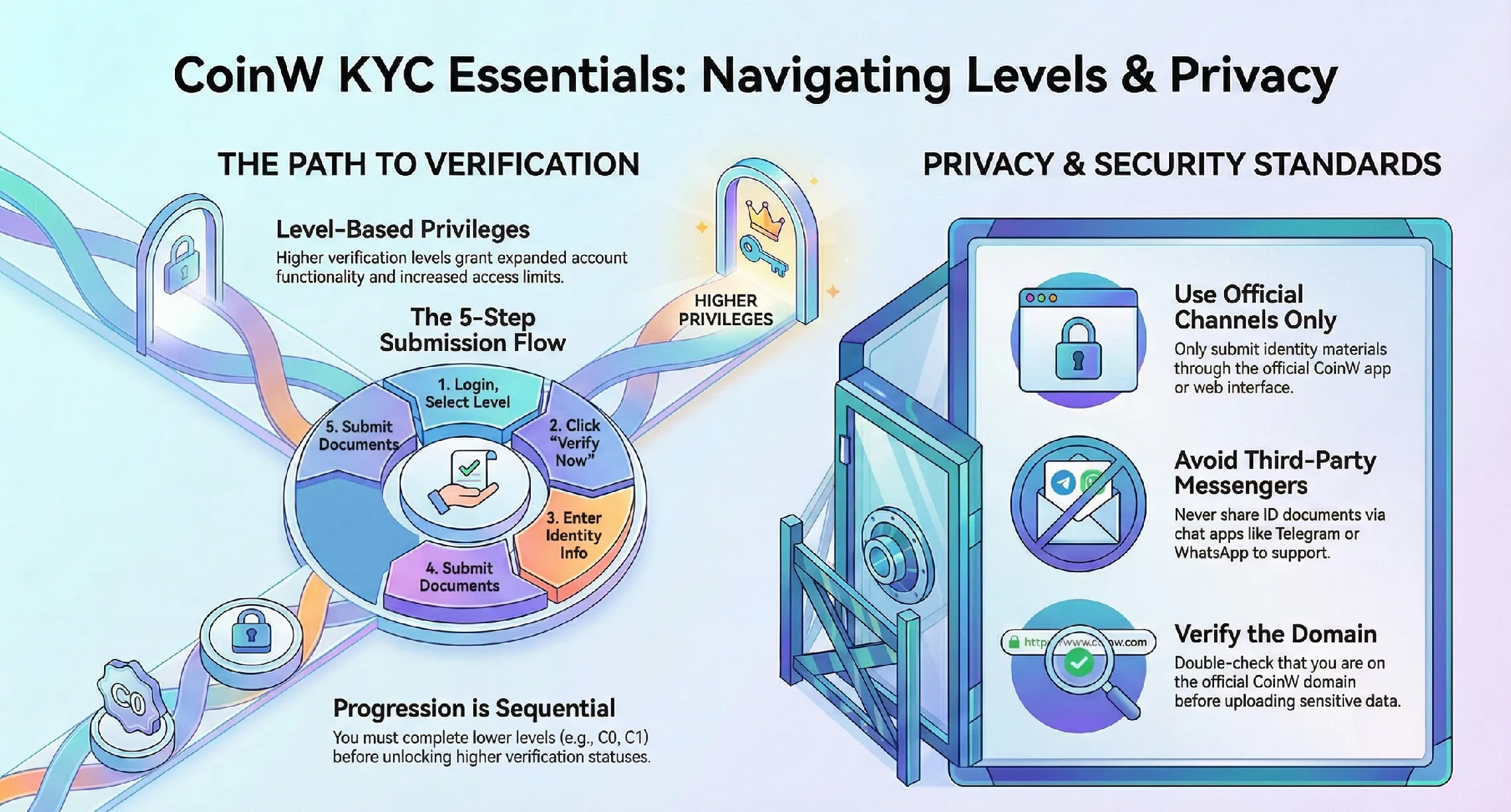
CoinW organizes identity verification into levels. After you register an account (email or phone), CoinW indicates your account is automatically classified as unverified, and identity authentication proceeds sequentially through levels (commonly shown as C0 and higher levels such as C1, C2, and C3).
CoinW also notes that different verification levels come with different privileges. As a general rule, higher verification status can unlock higher access or expanded functionality, depending on the platform’s current requirements and your situation.
The CoinW Identity Verification Process
CoinW’s KYC operation guide describes an identity authentication path that starts from the verification interface and proceeds level by level. While screens may vary by device, region, and product updates, the process is structured to guide you through each step in order.
High-level steps (based on CoinW’s official flow)
- Log in to your CoinW account and open the identity authentication (KYC) interface.
- Select the verification level you want to complete (CoinW indicates verification proceeds sequentially).
- Choose the “Verify Now” option under the relevant level to enter the verification workflow.
- Enter your identity information and follow the on-screen prompts to submit the required materials.
- Submit your application and check the verification result/status in your account’s verification section.
Privacy: What to Expect and How to Protect Yourself
Identity verification requires you to provide information that can confirm who you are. Because this is sensitive, the safest approach is to complete KYC only through official CoinW pages and in-app verification screens, and to avoid sharing identity materials through unofficial channels or third-party messengers.
Privacy and safety best practices
- Use the official verification interface: start from CoinW’s KYC page and follow the on-screen flow rather than links sent by unknown parties.
- Don’t send documents via chat apps: avoid providing ID images or personal details to anyone claiming to be “support” outside official CoinW channels.
- Double-check your environment: verify the page you’re using is the official CoinW domain before uploading any materials.
- Submit only what the flow requests: provide the required information for your verification level and avoid oversharing beyond the prompts.
Common KYC Questions (CoinW User FAQ Topics)
Do I have to complete KYC in order?
Yes. CoinW explains that identity authentication proceeds sequentially through verification levels. If you want a higher level, you generally need to complete the preceding level first.
How long does KYC take?
CoinW’s KYC guidance indicates that review timing can be referenced in the official Help Center instructions and may vary in special circumstances (for example, when submission volume is high). For the most accurate estimate, rely on the current guidance shown in the Help Center and your verification screen.
What if my verification fails or gets stuck?
If your verification does not pass, the safest next step is to return to the CoinW verification interface and the official KYC FAQ to review the requirements for your verification level, then resubmit following the prompts carefully.
Quick Checklist: KYC, Privacy, and Compliance
- Start KYC from the official CoinW verification interface (not from third-party messages).
- Complete verification levels sequentially as described by CoinW.
- Enter identity details carefully and follow the on-screen prompts for your verification level.
- Protect your privacy: don’t share ID materials outside official CoinW flows.
- Use CoinW’s Help Center as your source of truth for the latest requirements and updates.
Bottom Line
CoinW’s KYC requirements are designed to support compliance outcomes tied to AML/KYC/CTF considerations and to improve user safety through identity authentication and level-based access. For the most accurate, current requirements and privacy-safe completion steps, always use CoinW’s official Help Center documentation and the in-app verification interface.