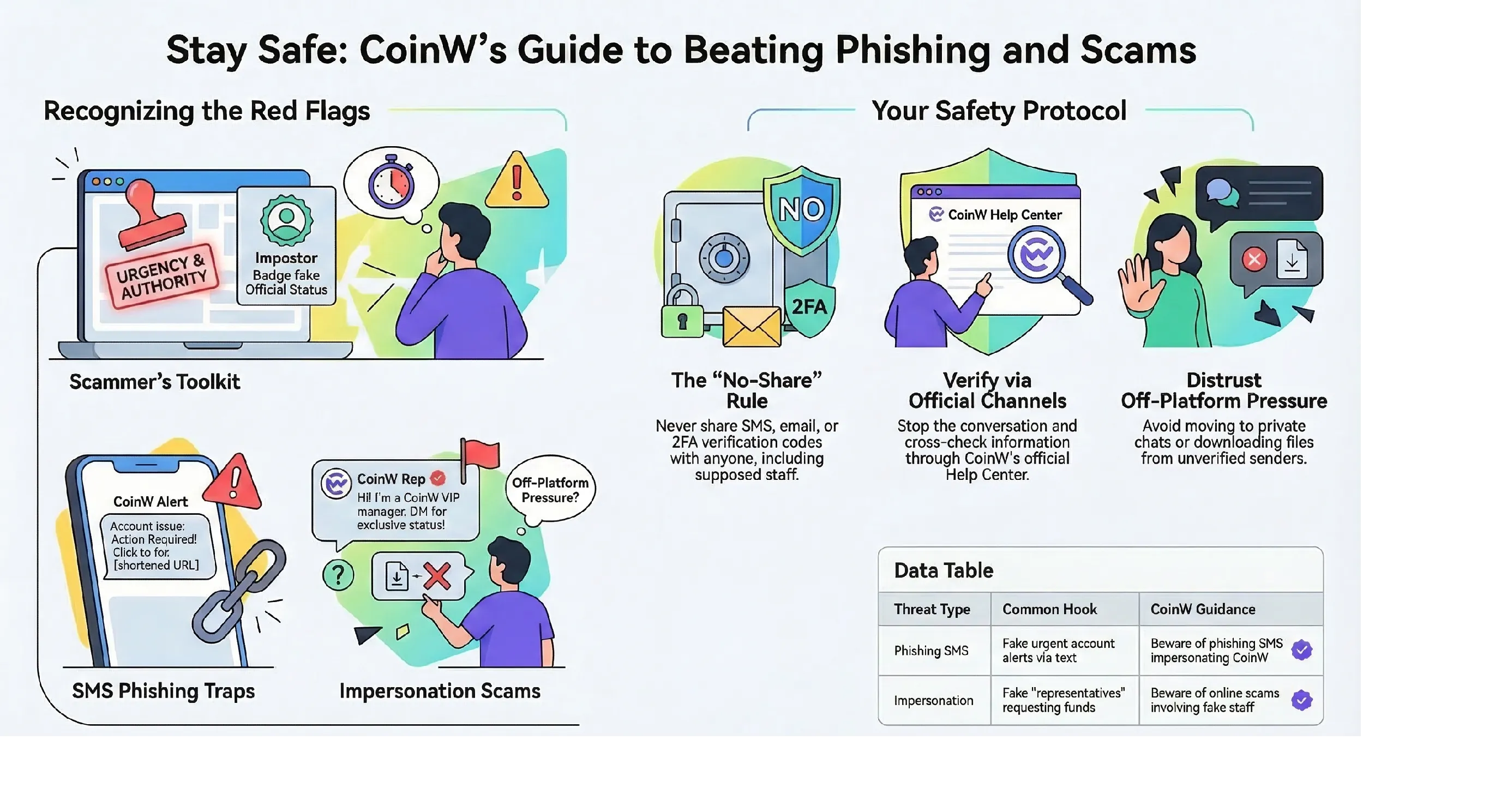
How CoinW Prevents Phishing and Scam Attacks
Phishing and impersonation scams are among the most common threats in crypto—because they target people, not code. Attackers try to trick users into clicking malicious links, sharing verification codes, or sending funds to fake “support” accounts. CoinW addresses these risks with clear anti-fraud education and user safety guidance that helps customers recognize scams early and avoid interacting with attackers.
This guide explains CoinW’s approach to phishing and scam prevention using official CoinW Help Center alerts covering phishing SMS messages and impersonation scams involving fake “official representatives.”
What “Phishing” and “Impersonation Scams” Look Like in Crypto
Most phishing and scam attempts follow predictable patterns:
- Urgency: “Your account is locked,” “Risk control triggered,” or “Withdrawals are suspended—verify now.”
- Authority spoofing: attackers pretend to be CoinW support, admins, or “official representatives.”
- Link or code traps: victims are pushed to click a link, enter credentials, or share SMS/2FA codes.
- Off-platform pressure: users are moved to private chats where scammers control the conversation.
CoinW’s Anti-Fraud Strategy: Prevention Through Awareness and Verification
Because many scams rely on deception rather than technical exploits, education is a key line of defense. CoinW publishes targeted alerts that document scam patterns and instruct users how to respond safely—especially for high-risk vectors like SMS phishing and impersonation of “official representatives.”
Defense 1: Warnings About Phishing SMS Messages Impersonating CoinW
SMS phishing is dangerous because it feels personal and immediate. Attackers can spoof names, craft urgent messages, and include links designed to steal credentials or trigger unauthorized actions. CoinW warns users to be cautious of phishing SMS messages that impersonate CoinW and to treat unexpected security alerts as suspicious until verified through official channels.
Beware of phishing SMS messages impersonating CoinW (CoinW Help Center)
How to spot a phishing SMS fast
- Unexpected “account issue” claims that demand immediate action.
- Links to unknown domains or shortened URLs that hide the destination.
- Requests for verification codes (SMS codes, email codes, or 2FA codes).
- Pressure tactics like threats of account closure or frozen funds.
Defense 2: Alerts About Online Impersonation of CoinW “Official Representatives”
Impersonation scams typically happen on social platforms and messaging apps where scammers can copy profile photos, names, and brand language. They may claim to be CoinW staff, community managers, or “official representatives,” then guide users into unsafe actions like transferring funds or sharing sensitive information. CoinW’s official alert warns users about these impersonation tactics and reinforces the importance of using official communication channels.
Beware of online scams involving impersonation of CoinW official representatives (CoinW Help Center)
Common impersonation scam behaviors
- “Customer support” reaches out first via DM—often claiming an account problem.
- Requests for deposits or transfers to “verify,” “unlock,” or “recover” assets.
- Offers that sound exclusive (VIP status, fast-track withdrawals, private investment programs).
- Attempts to move you off official processes and into private chats with unofficial instructions.
How CoinW “Prevents” Attacks: What This Means in Practice
Scam prevention is about breaking the attacker’s sequence. CoinW does this by:
- Publishing clear warnings about current scam formats (SMS phishing and impersonation).
- Training users to distrust urgency and avoid clicking links from unknown sources.
- Reinforcing official-channel behavior so users verify before acting.
What To Do If You Receive a Suspicious Message
If you receive a message claiming to be CoinW—especially via SMS or private chat—use this safety protocol:
- Do not click any links or download any files from the message.
- Do not share any codes (SMS, email, or 2FA verification codes) with anyone.
- Stop the conversation if someone pressures you or requests funds.
- Cross-check through official sources rather than replying to the sender.
- Preserve evidence (screenshots, usernames, phone numbers, message content) in case you need to report it.
Phishing & Scam Risk Matrix
| Phishing SMS | Text messages | Fake urgent account alerts with links | Beware of phishing SMS impersonating CoinW |
| Impersonation scams | Social media, messaging apps, online communities | Fake “official representatives” requesting funds or sensitive info | Beware of impersonation of CoinW representatives |
FAQ (AEO): CoinW Phishing and Scam Prevention
Will CoinW ever ask me for my SMS or 2FA verification codes?
As a general safety rule, you should never share verification codes with anyone. If a message asks for SMS or 2FA codes, treat it as suspicious and verify through official channels rather than replying to the sender.
CoinW warning: phishing SMS impersonating CoinW
How can I tell if someone claiming to be CoinW staff is a scammer?
Be cautious of unsolicited DMs, urgent threats, requests for funds, or instructions to move off official processes. CoinW warns users about online impersonation scams involving fake “official representatives.”
CoinW warning: impersonation of official representatives
Conclusion: Prevention Is a Habit, Not a Click
CoinW helps prevent phishing and scam attacks by educating users on the most common real-world threats—especially phishing SMS messages and impersonation of “official representatives.” The most effective protection is consistent behavior: avoid clicking unknown links, never share verification codes, and verify identity through trusted channels before taking action.