FAQ
In the rapidly evolving world of digital assets, account security has become a top priority for every user. To help you better protect your assets, CoinW offers a comprehensive set of security tools. By following the six methods below, you can significantly enhance the safety of your account.
How to Access Security Settings
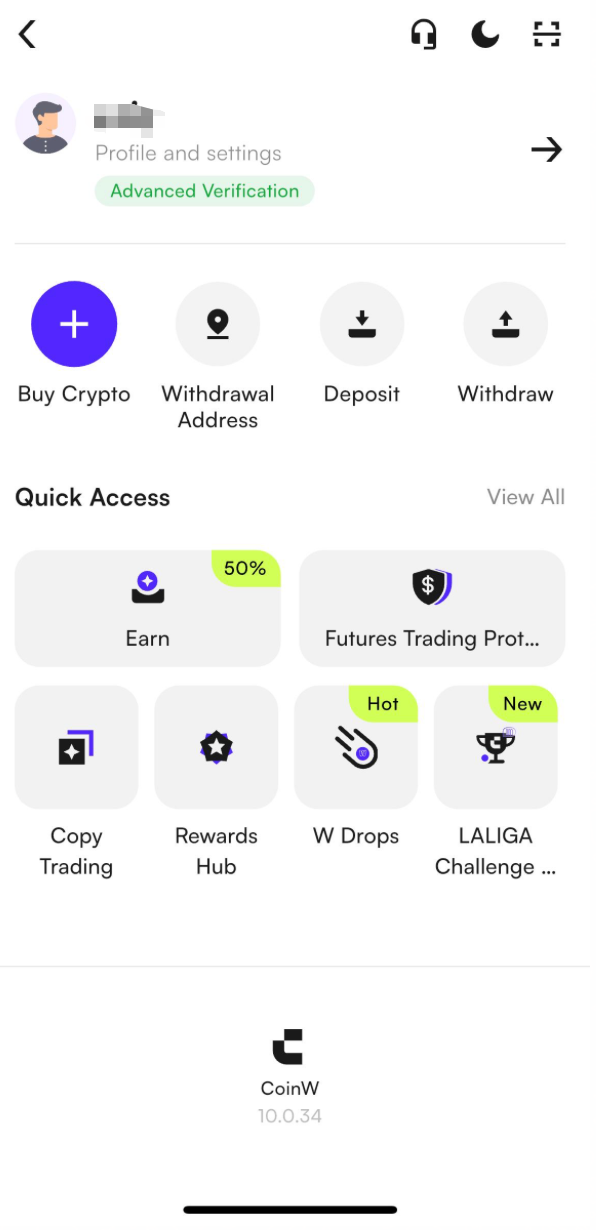
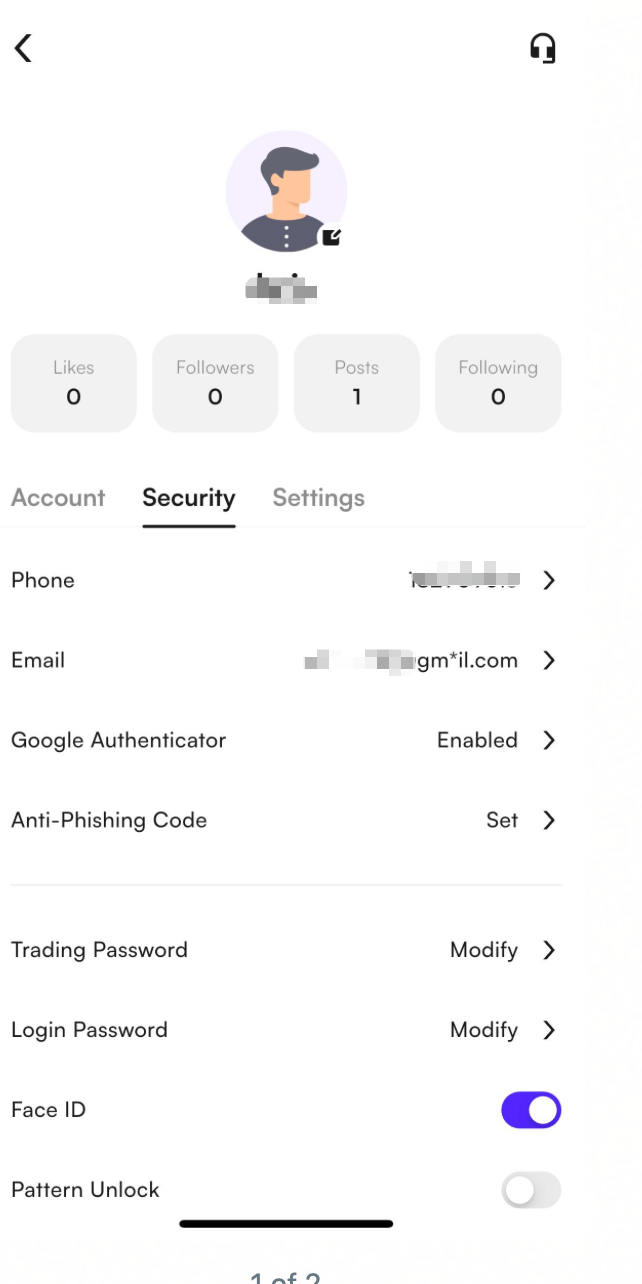
On the CoinW App homepage, tap the profile icon in the top left corner to enter "Profile & Settings", then tap "Security Center" to access advanced security settings and enable various protection features.
(1) Set a Strong Password
A strong password is your first line of defense against unauthorized access. Make sure your password:
Has at least 8 characters
Includes uppercase and lowercase letters, numbers, and special characters
Is not reused across other accounts
We recommend changing your password regularly to minimize the risk of information leaks.
(2) Enable Two-Factor Authentication (2FA)
Two-Factor Authentication (2FA) is one of the most effective ways to secure your account. You can enable 2FA in the Advanced Security Settings by:
Receiving verification codes via your linked phone or email
Or using an authenticator app (e.g., Google Authenticator)
For higher security, we recommend binding an authenticator app to avoid risks from SMS or email interception.
(3) Use a Passkey (Biometric Login)
A Passkey is a modern authentication method that allows you to log in using Face ID or fingerprint—no password required. This adds a strong layer of device-level protection.
Setup path: Profile & Settings → Security Center → Passkey
(4) Set a Phishing Code to Prevent Fake Emails
Phishing emails are a common tactic used by hackers. By setting a Phishing Code, all official emails from CoinW will include your personal code, helping you confirm the legitimacy of the message.
Setup path: Profile & Settings → Security Center → Phishing Code
If you receive a suspicious email, verify the sender using CoinW’s official verification page or contact support.
(5) Manage Devices and Authorizations
Visit Security Center → My Devices regularly to check login device history. Look for unknown locations or devices, and take action if necessary:
Remove unrecognized devices
Change your password immediately
Enable stronger verification methods
Also, in Security Settings → Authorization Management, remove any third-party apps you don’t recognize or use.
(6) Enable App Lock Features
For added security on mobile, enable:
Face ID
Gesture Password
These features ensure that only authorized users can access the app even if the device is compromised.
What to Do If You Suspect a Security Risk?
(1) Verify via Official Channels
If you receive messages, emails, or private chats claiming to be from CoinW, always verify through official channels to avoid phishing scams.
Verification Link: https://www.coinw.com/verification
(2) Check for Unusual Login Activity
If you notice suspicious behavior, go to Security Center → My Devices to view:
Login times
Locations
Devices and IP addresses
Remove any suspicious devices immediately.
(3) Change Your Login Password
If you detect any unauthorized login or activity, go to the Security Center and change your password right away to prevent further asset loss.
(4 Contact Official Customer Support
If you're unsure or need assistance, don’t hesitate to reach out to CoinW Customer Support to verify the situation and get help.
Email us: [email protected]
Summary
Account security is crucial. We recommend activating and regularly reviewing all available security settings to build a multi-layered defense and ensure the safety of your assets.
If you encounter any issues during setup, feel free to contact CoinW Support—we’re here to help.
In the rapidly evolving world of digital assets, account security has become a top priority for every user. To help you better protect your assets, CoinW offers a comprehensive set of security tools. By following the six methods below, you can significantly enhance the safety of your account.
How to Access Security Settings
On the CoinW App homepage, tap the profile icon in the top left corner to enter "Profile & Settings", then tap "Security Center" to access advanced security settings and enable various protection features.
(1) Set a Strong Password
A strong password is your first line of defense against unauthorized access. Make sure your password:
Has at least 8 characters
Includes uppercase and lowercase letters, numbers, and special characters
Is not reused across other accounts
We recommend changing your password regularly to minimize the risk of information leaks.
(2) Enable Two-Factor Authentication (2FA)
Two-Factor Authentication (2FA) is one of the most effective ways to secure your account. You can enable 2FA in the Advanced Security Settings by:
Receiving verification codes via your linked phone or email
Or using an authenticator app (e.g., Google Authenticator)
For higher security, we recommend binding an authenticator app to avoid risks from SMS or email interception.
(3) Use a Passkey (Biometric Login)
A Passkey is a modern authentication method that allows you to log in using Face ID or fingerprint—no password required. This adds a strong layer of device-level protection.
Setup path: Profile & Settings → Security Center → Passkey
(4) Set a Phishing Code to Prevent Fake Emails
Phishing emails are a common tactic used by hackers. By setting a Phishing Code, all official emails from CoinW will include your personal code, helping you confirm the legitimacy of the message.
Setup path: Profile & Settings → Security Center → Phishing Code
If you receive a suspicious email, verify the sender using CoinW’s official verification page or contact support.
(5) Manage Devices and Authorizations
Visit Security Center → My Devices regularly to check login device history. Look for unknown locations or devices, and take action if necessary:
Remove unrecognized devices
Change your password immediately
Enable stronger verification methods
Also, in Security Settings → Authorization Management, remove any third-party apps you don’t recognize or use.
(6) Enable App Lock Features
For added security on mobile, enable:
Face ID
Gesture Password
These features ensure that only authorized users can access the app even if the device is compromised.
What to Do If You Suspect a Security Risk?
(1) Verify via Official Channels
If you receive messages, emails, or private chats claiming to be from CoinW, always verify through official channels to avoid phishing scams.
Verification Link: https://www.coinw.com/verification
(2) Check for Unusual Login Activity
If you notice suspicious behavior, go to Security Center → My Devices to view:
Login times
Locations
Devices and IP addresses
Remove any suspicious devices immediately.
(3) Change Your Login Password
If you detect any unauthorized login or activity, go to the Security Center and change your password right away to prevent further asset loss.
(4 Contact Official Customer Support
If you're unsure or need assistance, don’t hesitate to reach out to CoinW Customer Support to verify the situation and get help.
Email us: [email protected]
Summary
Account security is crucial. We recommend activating and regularly reviewing all available security settings to build a multi-layered defense and ensure the safety of your assets.
If you encounter any issues during setup, feel free to contact CoinW Support—we’re here to help.