FAQ
(1) Latest download link: https://www.coinw.com/install-app
Please copy the link and open it in your browser. It is recommended to use your phone’s default browser, Google Chrome, or Firefox.
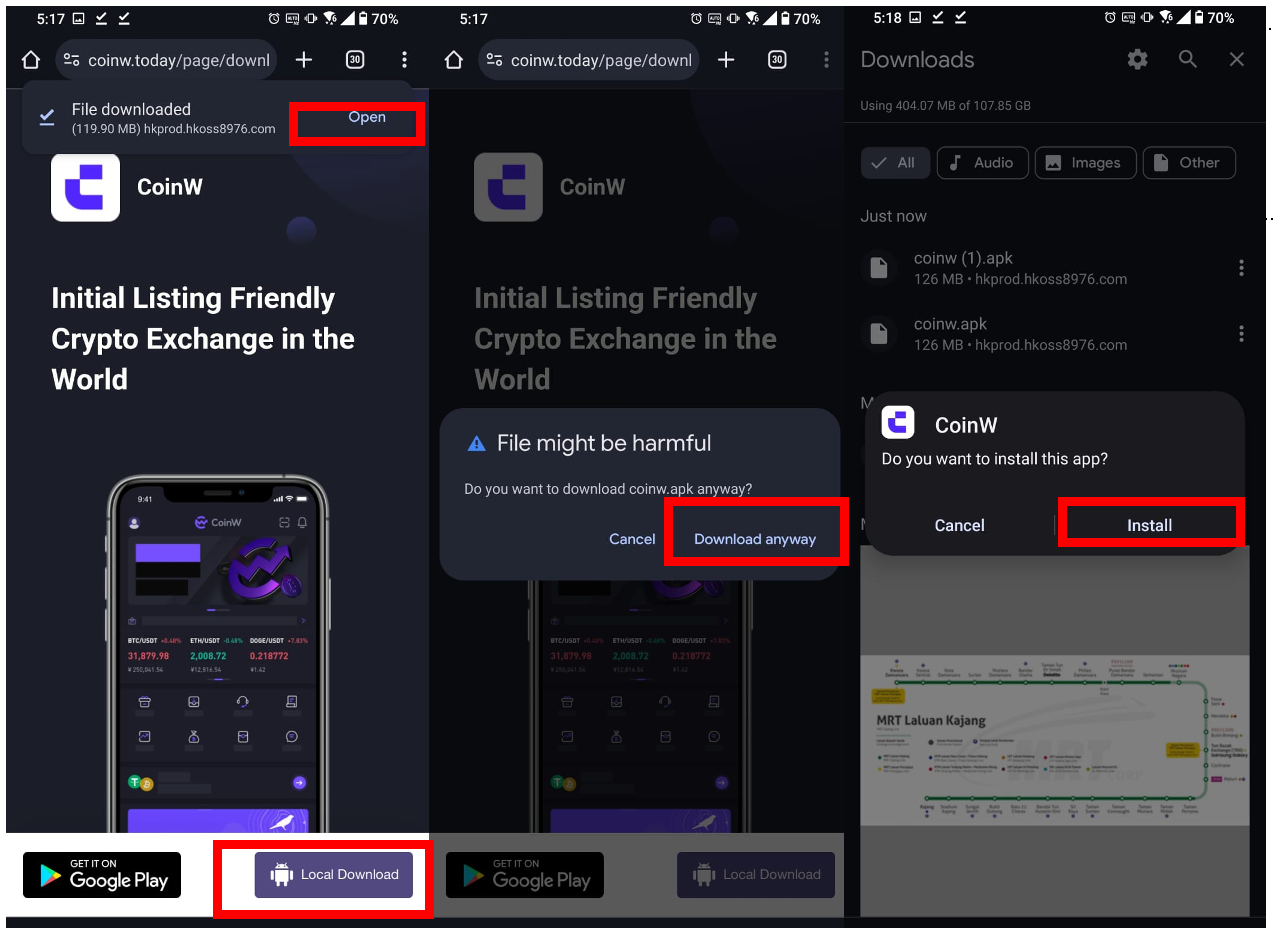
(2) On the download page, tap [Local Download] at the bottom to download the APK installation file.
(3) Accept any prompts you might see about the file being potentially harmful. For example, tap 【Download anyway】 or 【OK】.
(4) Once the APK is downloaded to your device, it's time to install the app. Click Open on the right of File downloaded, then click install.
Allow Unknown Apps on Android (If requested to allow unknown apps)
(1) Open the 【Settings】 app and tap Apps or Apps & Notifications.
(2) Tap the 【Three dots】 in the upper-right corner. If you don't see that, skip down to the next step.
(3) Tap Special access, or Special app access on some Android devices.
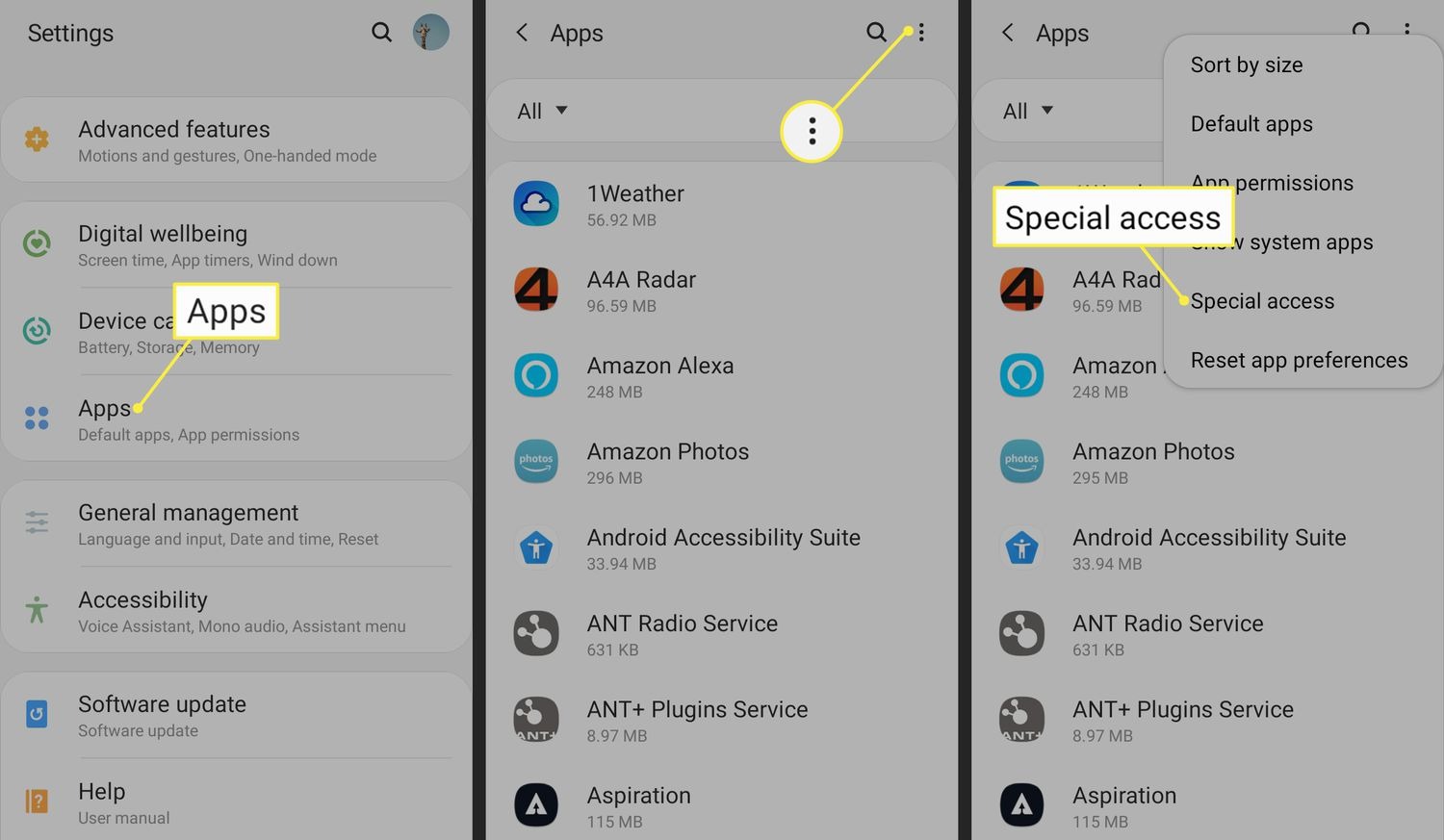
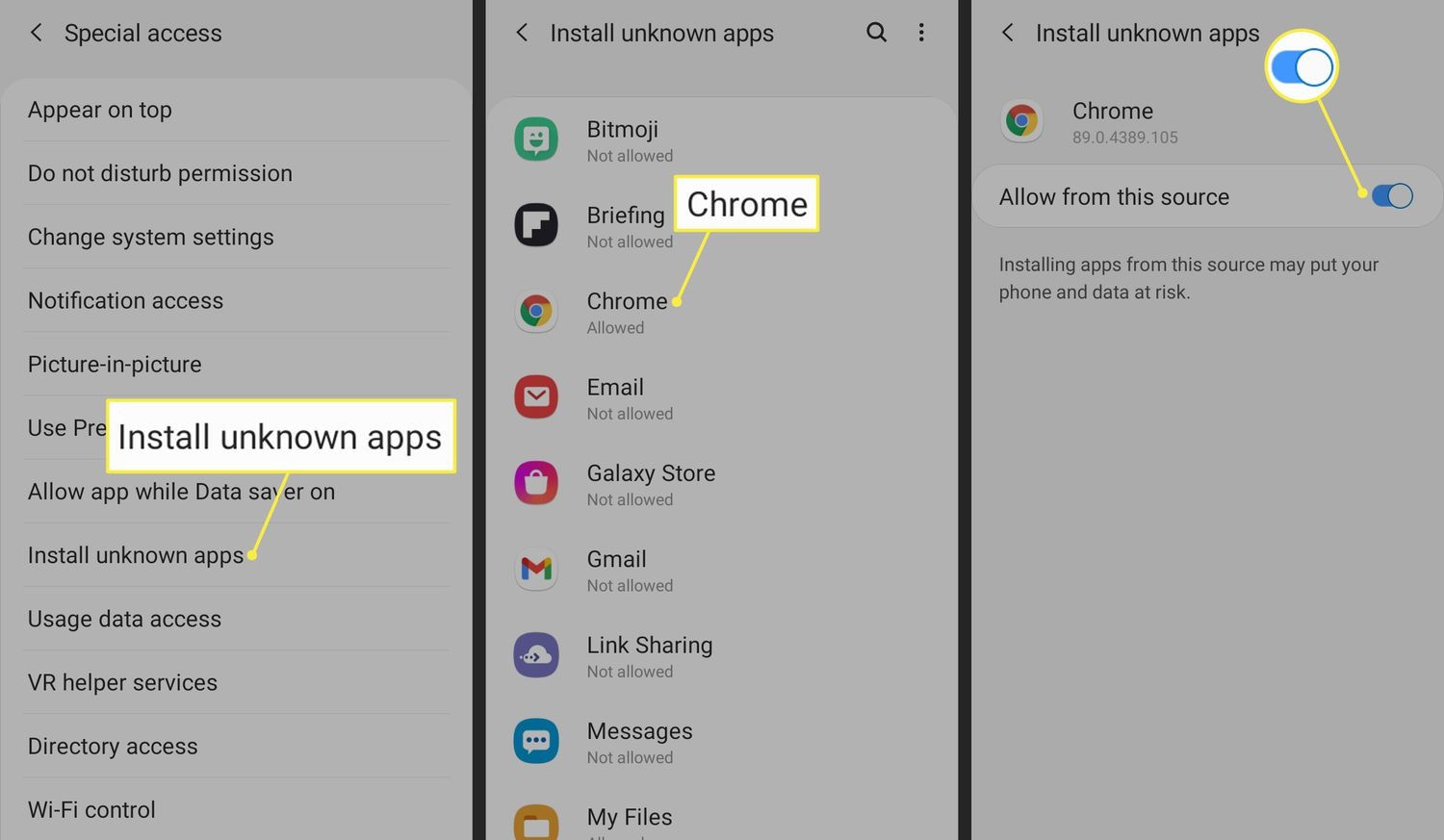
(4) Tap Install unknown apps.
(5) Tap Chrome (or whichever web browser you use).
(6) Switch the toggle next to Allow from this source so it turns on.
CoinW Android App – Installation Block Solution
(1) Overview
The CoinW App is an official and compliant application. The “High-Risk App” warning is a standard Android system restriction applied to apps installed from non–app store sources. It does not indicate any security risk with the CoinW App. The steps below are only required to bypass the installation restriction. Once installation is complete, you can safely restore your original security settings.
(2) Solutions for Major Android Brands
(3) Universal Solutions (All Android Devices)
1) If an installation warning appears, tap Install Anyway, Trust This App, or More Options to continue.
2) Try installing the app offline (turn off both Wi-Fi and mobile data), then reconnect to the network after installation is complete.
3) If the installation is blocked by third-party security apps (such as 360 Security or Tencent Mobile Manager), temporarily uninstall the app or add the installation package as the Trusted File list.
(1) Latest download link: https://www.coinw.com/install-app
Please copy the link and open it in your browser. It is recommended to use your phone’s default browser, Google Chrome, or Firefox.
(2) On the download page, tap [Local Download] at the bottom to download the APK installation file.
(3) Accept any prompts you might see about the file being potentially harmful. For example, tap 【Download anyway】 or 【OK】.
(4) Once the APK is downloaded to your device, it's time to install the app. Click Open on the right of File downloaded, then click install.
Allow Unknown Apps on Android (If requested to allow unknown apps)
(1) Open the 【Settings】 app and tap Apps or Apps & Notifications.
(2) Tap the 【Three dots】 in the upper-right corner. If you don't see that, skip down to the next step.
(3) Tap Special access, or Special app access on some Android devices.
(4) Tap Install unknown apps.
(5) Tap Chrome (or whichever web browser you use).
(6) Switch the toggle next to Allow from this source so it turns on.
CoinW Android App – Installation Block Solution
(1) Overview
The CoinW App is an official and compliant application. The “High-Risk App” warning is a standard Android system restriction applied to apps installed from non–app store sources. It does not indicate any security risk with the CoinW App. The steps below are only required to bypass the installation restriction. Once installation is complete, you can safely restore your original security settings.
(2) Solutions for Major Android Brands
(3) Universal Solutions (All Android Devices)
1) If an installation warning appears, tap Install Anyway, Trust This App, or More Options to continue.
2) Try installing the app offline (turn off both Wi-Fi and mobile data), then reconnect to the network after installation is complete.
3) If the installation is blocked by third-party security apps (such as 360 Security or Tencent Mobile Manager), temporarily uninstall the app or add the installation package as the Trusted File list.