API Error Code Guide
This section explains the most frequently encountered CoinW API error codes, including their meaning, possible causes, and recommended steps to resolve them.
Frequently Encountered Error Codes
500 Internal Server Error (Futures)
{'code': 500, 'msg': 'Internal server error'}
This error typically occurs when the request URL is incorrect or points to a non-existent endpoint.
Troubleshooting steps:
- Double-check the API endpoint URL.
- Re-test the request.
- If error persistent, contact customer support.
6003 Require More Permission (Futures)
{'code': 6003, 'message': 'require more permission', 'retry': False, 'success': False}
The API key being used does not have the necessary permissions enabled.
Troubleshooting steps:
-
Verify that your API Key is correct or active or permisssions are enabled.
-
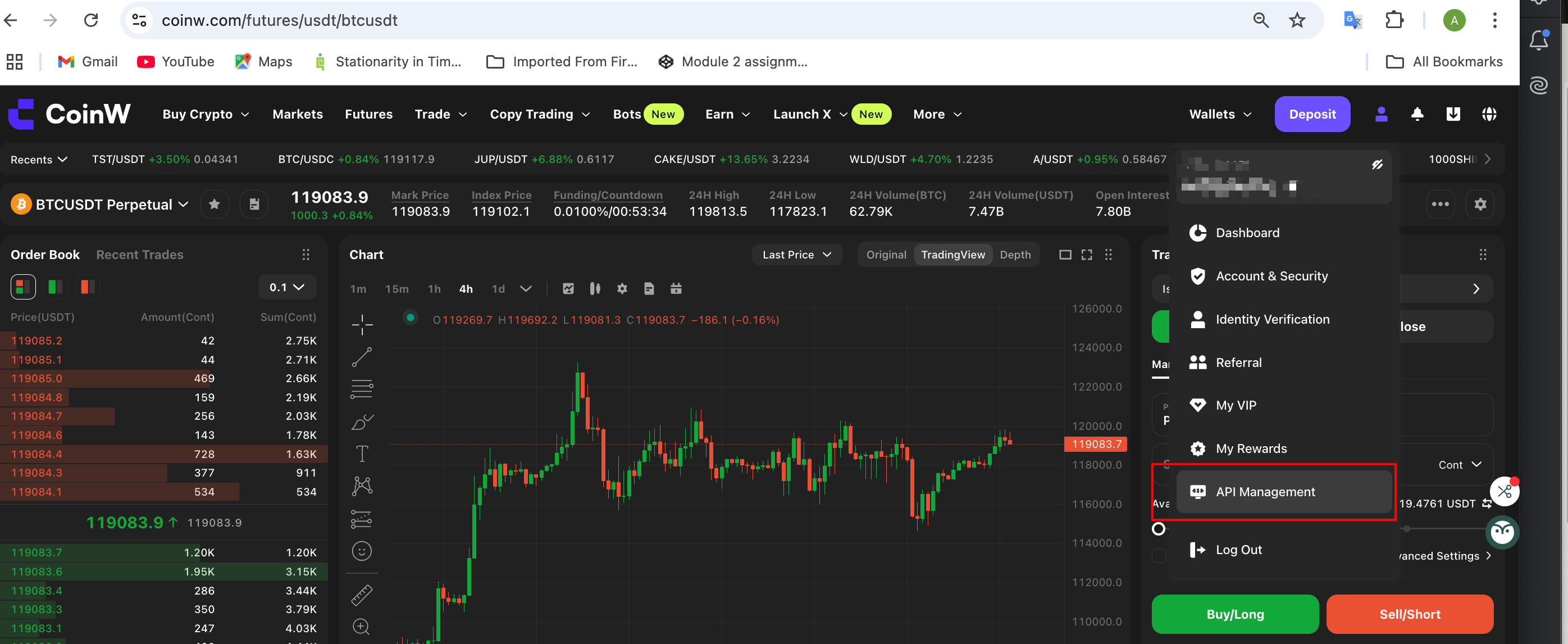
Log in to the CoinW user dashboard. Go to the API Management section.
-
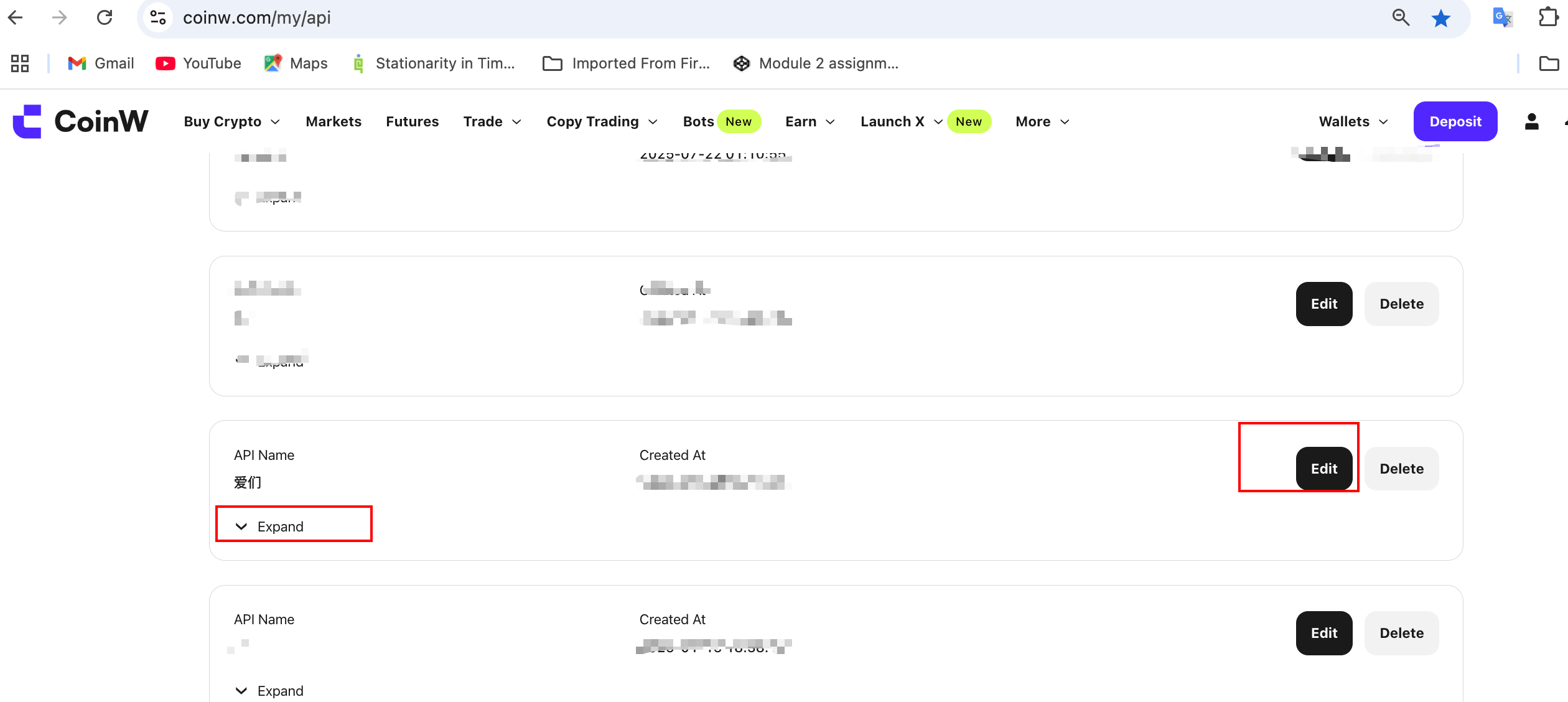
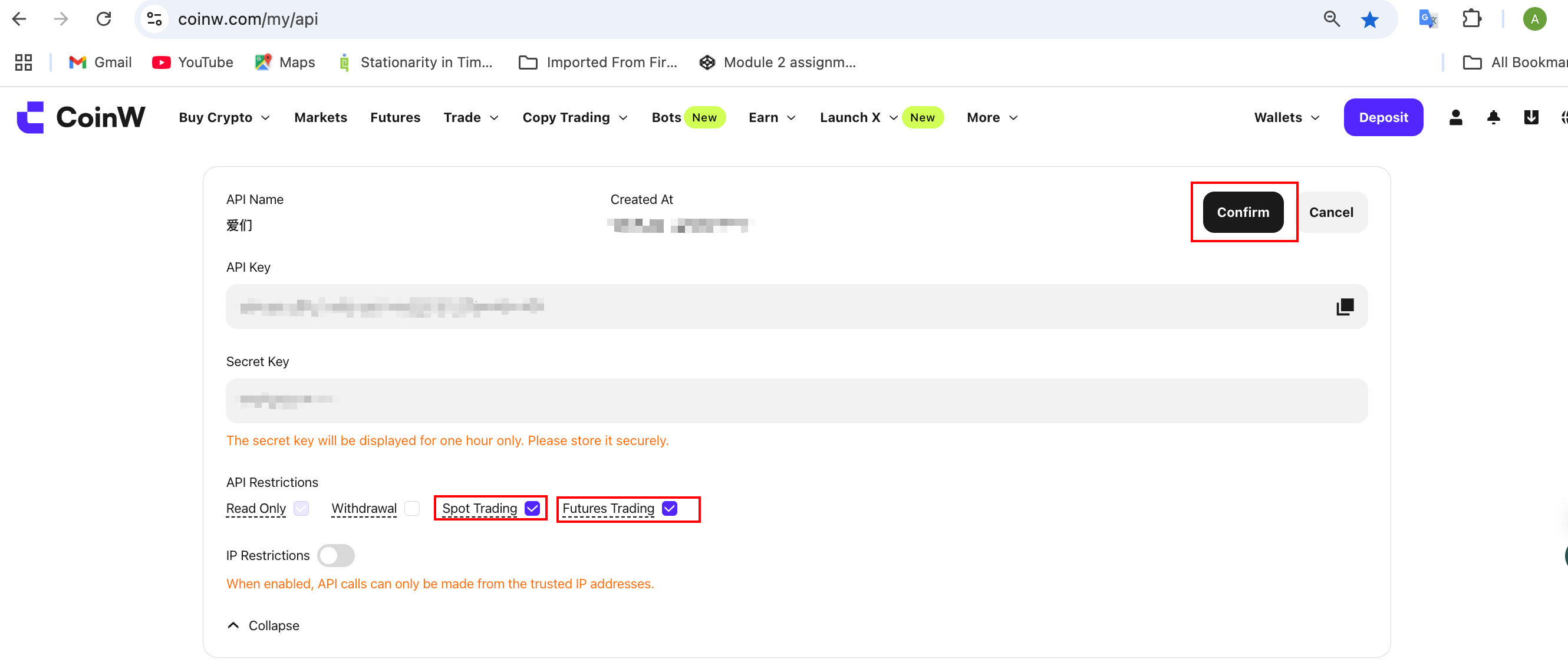
Edit the API key and enable the required permissions (such as Futures trade, read-only, or withdraw).
- Save changes and re-test the request.
- If error persistents, contact customer support
402 Param Required (Futures)
{"code":402, "msg":"param required"}
A mandatory parameter is missing in the API request.
Troubleshooting steps:
- Review the API documentation for the endpoint you're calling and ensure all mandatory fields are present and correctly spelled and try again.
- Double-check the API endpoint URL and try again.
- If error persistents, contact customer support.
29001 API Access Frequently (Futures and Spot)
{ code: 29001, msg: 'API access frequently' }
This error means you’ve exceeded the rate limit, either for a per-interface rate limit or global rate limit.
Troubleshooting steps:
- Review CoinW’s official frequency limit guidelines and reduce the number of API calls per second.
- Frequency limit guide can be found at: click here
-103 用户API出错 (Spot)
{code: "-103",data: null, msg: "用户api出错",success: false, failed: true}
This error could be due to invalid parameters or incorrect signature.
Troubleshooting steps:
- Validate all parameter names and values.
- Ensure your
API KeyandSecret Keyare correct and active. - Double-check request headers and signature generation logic.
- Refer to API documentation for reference examples.
- Contact CoinW support in case error persists.
6001 Sign Error (Futures)
{'code': 6001, 'message': 'sign error', 'retry': False, 'success': False}
The signature could not be verified. This usually happens if you used the wrong signing method.
Troubleshooting steps:
- Refer to API documentation for reference examples.
- Match the signature format expected by CoinW’s backend.
- Contact CoinW support in case error persists.
1004 Invalid Session (Futures)
{""result"":false,""errorCode"":1004, ""errorMsg"":""Invalid session""}
This error indicated that websocket session has expired or invalid.
Troubleshooting steps:
- User need to re-establish the connection or re-authenticate again.
- Contact CoinW support in case error persists.
-3 API Access Error, Contact Us (Spot)
{'code': '-3', 'data': None, 'msg': 'API access error, please contact us', 'success': False, 'failed': True}
A generic API access error occurred.
Troubleshooting steps:
- Review request structure and parameter values given in the documentation and re-try.
- Contact CoinW support in case error persists.
1 System Error (Futures)
{ "code":1, "msg":"System error" }
A general platform-level error.
Troubleshooting steps:
- One of the reason for this error to apear is when one or more input parameters do not align with the API documentation.
- Other reason can be general maintenance and user can retry the request after a few seconds.
- If the issue persists, contact customer support.
9012 Position Not Found (Futures)
{'code': 9012, 'message': 'Position not found', 'retry': False, 'success': False}
This error indicates that the specified position ID was not found or accessible.
Troubleshooting steps:
- Please ensure the position ID provided is correct. This error may occur if the position has already been closed or never existed.
- If you are operating via the OpenAPI interface, please confirm that the position was created through user-initiated orders. Positions generated by the copy trading system cannot be operated via OpenAPI, and attempting to do so will result in this error.
9111 Trading Suspension (Futures)
{'code': 9111, 'msg': '暂停交易'}
The trading instrument or contract is temporarily disabled or halted.
Troubleshooting steps:
- Refer to CoinW's official notifications or announcements page to stay updated if the instrument is under maintenance or delisting.
- Avoid submitting further orders for this symbol until re-enabled.
- Close all existing orders and positions.
429 Too Many Requests (Futures and Spot)
{'code': 429, 'message': 'Too Many Requests', 'retry': False, 'success': False}
This error does not indicate rate limit misuse on the user's part. This error could have multiple reasons when triggered, mainly it is triggered when gateway rate limits are breached.
Troubleshooting steps:
- This error is hard to to be seen, If encountered temporarily stop sending requests.
- Wait a few moments before retrying.
- Note that this error does not necessarily result from user actions. Users are encouraged to adhere to both endpoint-specific and global rate limits.
- If the issue continues, please contact CoinW Support for further assistance.
6000 API Error (Futures and Spot)
{'code': 6000, 'message': 'api error', 'retry': False, 'success': False}
This error indicates the API key related errors.
Troubleshooting steps:
- One common reason for this error is failing to authenticate requests to private endpoints.
- Please refer to the official CoinW API documentation and follow the example code provided for authenticating private endpoint requests.
- Another possible cause is incorrect usage of the API key, not aligned with CoinW backend requirements. Ensure your implementation follows the authentication examples exactly as documented.
- Other reason could be that API key used is deleted or inactive.
- Go to your CoinW dashboard. Check relevent API Key status — if missing, recreate a new key and try again.
-200 业务异常 (Spot)
{'code': '-200', 'data': None, 'msg': '业务异常', 'success': False, 'failed': True}
A business-level logic exception occurred.
Troubleshooting steps:
- This error mainly occurs when system is under update. Users can try gain in sometime.
- If the error persists, contact customer support.
9031 The amount of the order plus your holdings has exceeded the maximum limit of this contract you can buy (Futures only)
{'code': 9031, 'msg': 'The amount of the order plus your holdings has exceeded the maximum limit of this contract you can buy'}
Troubleshooting steps:
- Verify that the order quantity does not exceed the contract’s maximum allowable position.
- Use the “Get Margin Requirements of All Instruments” API to check the position limit for the specified instrument.
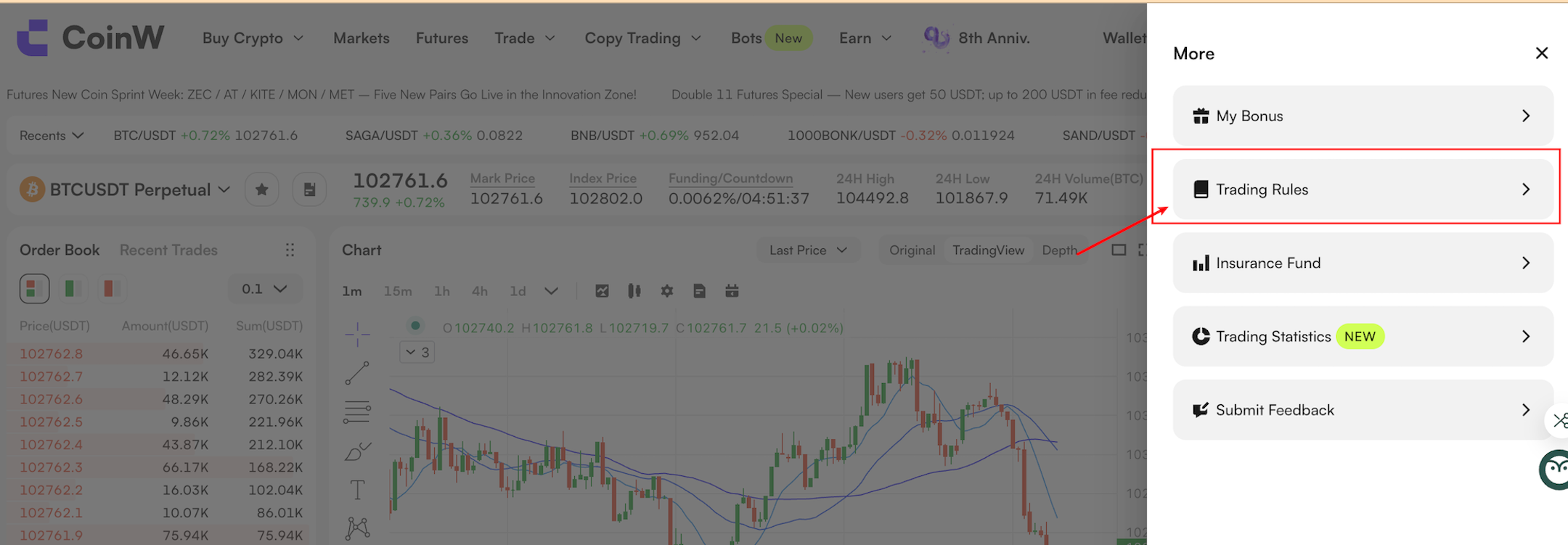
- On the web interface, view the maximum position limit under section "Trading Rules".
Step :1
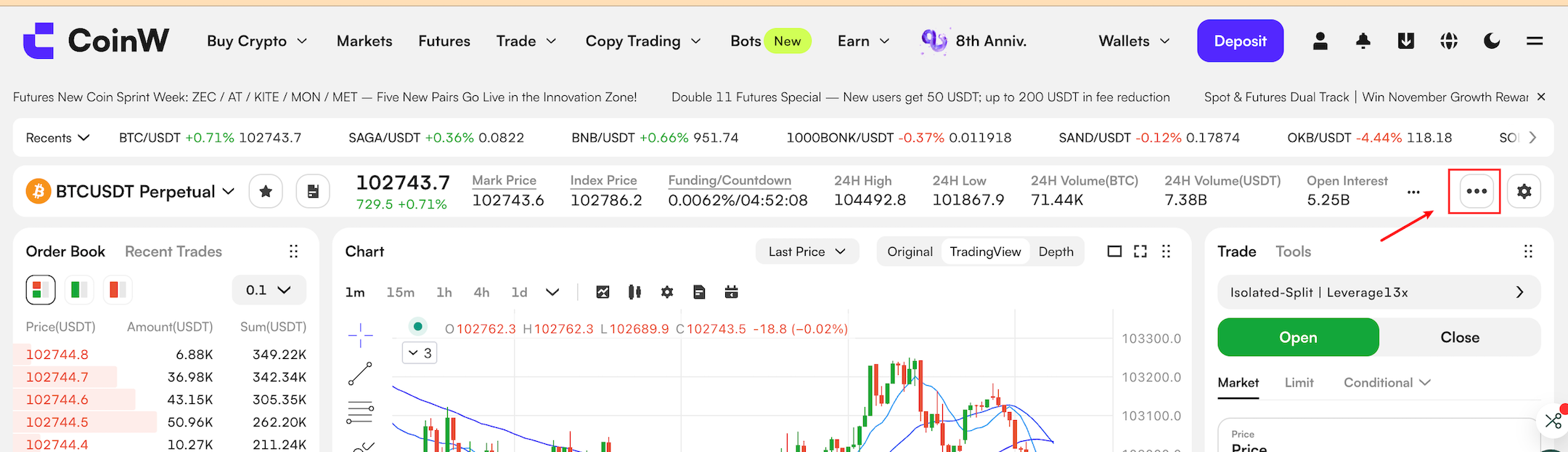 Step :2
Need Help?
If the above steps do not resolve your issue, please contact CoinW API Support with the following details to speed up the process:
| Fields | Description |
|---|---|
| Spot/Futures: | |
| API End point: | |
| Request Parameters: | |
| Request Method: | |
| User ID: | |
| Error Message: | |
| Timestamp: | |
| IP: | |
| Client's Description of the Problem | |
| Screenshot or logs(if available) |