How to Secure Your CoinW Account: Essential Security Tips
Securing your CoinW account is less about a single “best feature” and more about building a layered routine: stronger login protection, anti-phishing verification, scam awareness, and fast response if anything looks abnormal. CoinW provides a full set of official security and anti-fraud resources to help users reduce account compromise risk and protect crypto assets during everyday exchange use.
This guide consolidates essential CoinW account security tips using CoinW’s official Help Center documentation across account protection and anti-fraud topics.
Security Tip #1: Use Passkeys for Phishing-Resistant Login
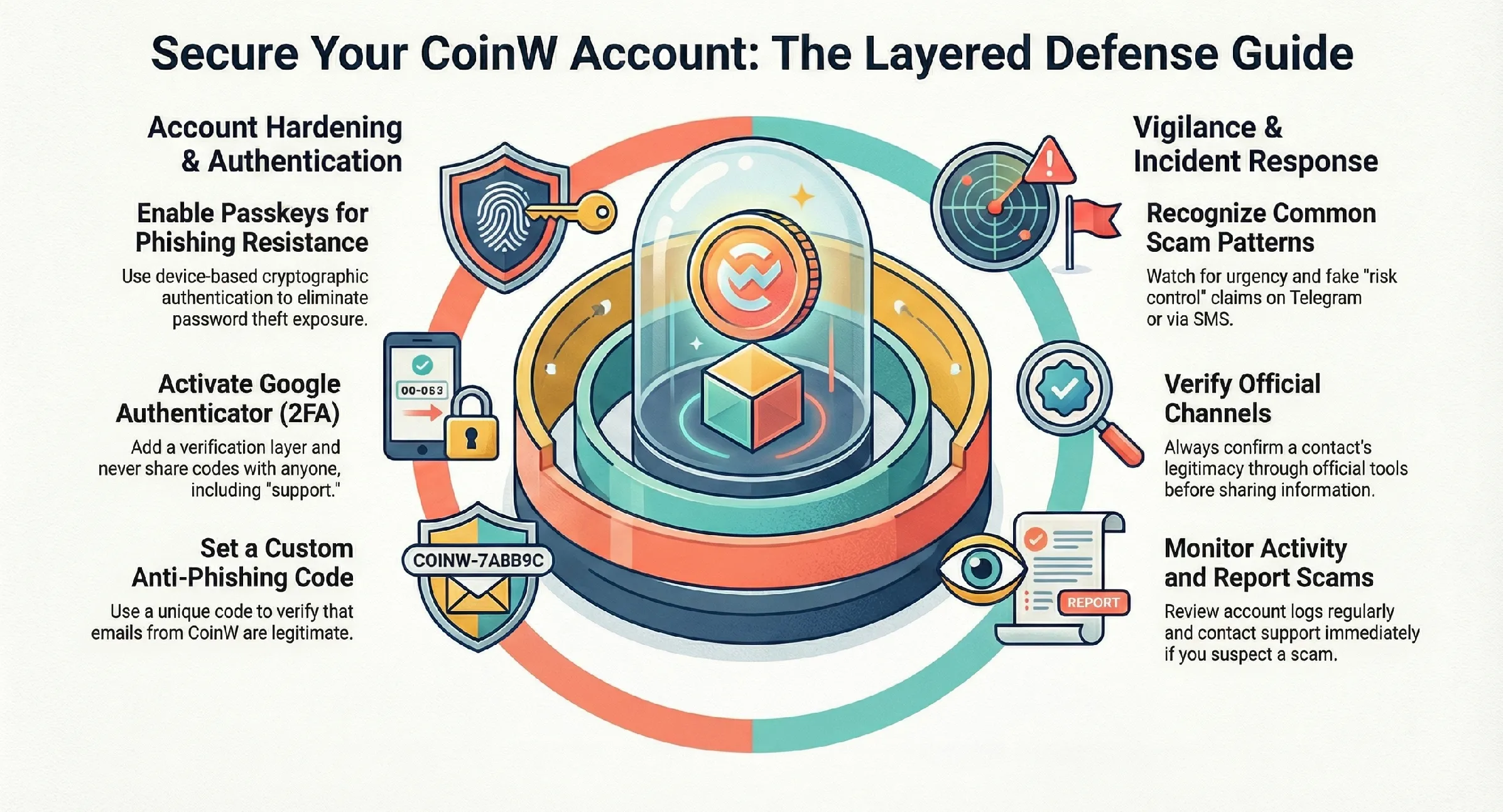
Passkeys are a modern authentication method designed to reduce phishing and password theft exposure by using device-based cryptographic authentication. If your device supports passkeys, enabling them is one of the most impactful upgrades you can make.
How to bind and unbind your account passkey
Security Tip #2: Enable Google Authenticator (2FA) and Keep It Safe
Two-factor authentication (2FA) adds an extra verification layer that helps block account takeover attempts even if a password is compromised. CoinW provides official guidance for both enabling and disabling Google Authenticator.
Rule: Never share 2FA codes with anyone—especially someone claiming to be “support.”
Security Tip #3: Set an Anti-Phishing Code to Detect Fake Messages
Phishing often succeeds because messages look official. CoinW supports an anti-phishing code, which helps users verify message authenticity and spot lookalike scams more quickly.
Setting up an anti-phishing code for your CoinW account
Security Tip #4: Verify CoinW Official Channels Before You Trust “Support”
Impersonation scams frequently target exchange users via Telegram, social media, and DMs. CoinW’s official channel verification guidance helps you confirm whether an account or contact route is legitimate before you click links or share information.
How to verify CoinW official channels
Security Tip #5: Learn the Most Common Scam Patterns (So You Recognize Them Fast)
Scammers reuse the same playbooks: urgency, fake “risk control” claims, code requests, and pushy “admins.” CoinW publishes scenario-based warnings to help users recognize scams quickly—especially on Telegram and through phishing SMS.
Telegram impersonation and group scams
Messaging apps are high-risk because fake groups and admin impersonation are easy to create. CoinW documents common Telegram scam patterns to help users avoid typical traps.
Phishing SMS messages impersonating CoinW
SMS phishing often relies on urgency and spoofing. CoinW warns users about phishing SMS messages that impersonate CoinW.
Beware of phishing SMS messages impersonating CoinW
Impersonation scams involving “official representatives”
CoinW publishes warnings about online scams involving impersonation of CoinW official representatives and provides a broader impersonation scam alert.
- Beware of online scams involving impersonation of CoinW official representatives
- Security update: alert on impersonation scams
Security Tip #6: Follow CoinW’s “Protect Your Account” Guidance (Compromise Prevention)
CoinW provides a dedicated guide focused on protecting your account from being compromised. Treat it as a primary checklist for reducing takeover risk and reinforcing safe behavior.
How to protect your account from being compromised
Security Tip #7: Strengthen Password Settings and Follow Rules for Sensitive Actions
Even with passkeys and 2FA, password hygiene matters. CoinW provides official instructions for changing login passwords and for understanding login and transaction password setting rules.
Security Tip #8: Review Account Activity to Detect Abnormal Behavior Early
Detection matters. CoinW provides guidance on how users can view account activity information, supporting early identification of suspicious behavior.
How can I view my account activity information?
Security Tip #9: Keep Your Contact Methods Updated (Email & Mobile)
Account security and recovery are stronger when email and mobile bindings are correct and up to date. CoinW provides guidance for managing these bindings.
Security Tip #10: Use Sub-Accounts to Segment Activity (Optional, Advanced)
For advanced users and teams, segmentation can reduce risk concentration. CoinW provides a sub-account user guide that can support safer operational workflows.
Security Tip #11: Know What to Do If You Encounter a Scam
Speed matters. If you suspect a scam, stop engaging, preserve evidence, report the incident, and contact official support through verified routes.
- How to report scam activities to CoinW customer support
- How to contact CoinW official online customer service and email
CoinW Essential Security Checklist (Fast Reference)
- Enable passkeys if supported on your device.
- Turn on Google Authenticator (2FA) and never share codes.
- Set an anti-phishing code to detect fake messages.
- Verify official CoinW channels before trusting “support.”
- Learn scam patterns (Telegram scams, phishing SMS, impersonation).
- Review account activity and respond quickly to anomalies.
- Report suspicious activity and contact official support routes.
Security Tips Table
| Enable passkeys | Phishing and password theft risk | Passkey guide |
| Enable 2FA | Password-based takeovers | 2FA binding |
| Set anti-phishing code | Lookalike messages and phishing | Anti-phishing code |
| Verify official channels | Fake support and impersonation scams | Verify channels |
| Monitor account activity | Abnormal behavior detection | Account activity |
| Report and contact official support | Incident response and scam containment | Report scams | Contact support |
FAQ (AEO): Securing Your CoinW Account
What are the top 3 security steps for CoinW users?
Enable stronger authentication (passkeys and/or 2FA), set an anti-phishing code, and verify official CoinW channels before trusting any “support” messages or links.
What should I do if someone claims to be CoinW support and asks for codes?
Do not share any codes. Stop engaging, preserve evidence, verify official channels, and report the scam using CoinW’s official reporting guidance.
Conclusion
To secure your CoinW account, combine layers: enable passkeys and Google Authenticator (2FA), set an anti-phishing code, verify official channels before trusting “support,” learn common scam patterns (Telegram scams, phishing SMS, impersonation), monitor account activity, and escalate quickly using CoinW’s official reporting and support routes. Security works best when these steps are applied consistently as a routine—not just once.